AI visibility tracking: how to set up prompts, metrics and reporting
AI visibility tracking means running a fixed set of buyer questions through ChatGPT, Google AI, Perplexity and Gemini on a schedule, and measuring how often you're mentioned, recommended and cited. Because answers vary run to run, you track rates, not ranks. This guide shows how to set it up and report it.
- Track rates across many runs, not positions. SparkToro found under a 1 in 100 chance of getting the same brand list twice.
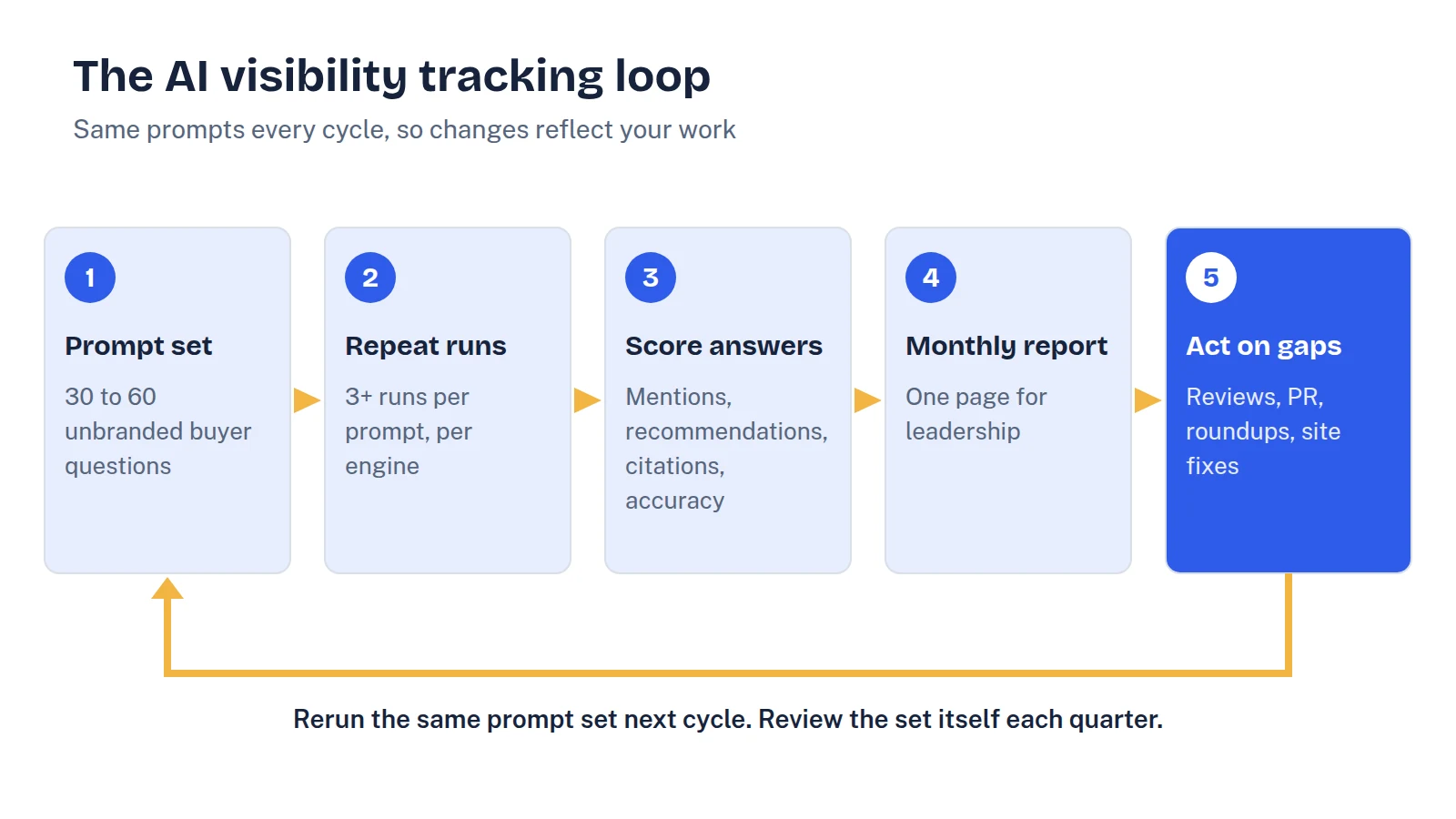
- Start with 30 to 60 unbranded prompts grouped by buying stage, and freeze the set for a quarter.
- Run each prompt at least three times per engine per cycle. Monthly is the right cadence for most teams.
- Report mention rate, recommendation rate, share of voice, citations and accuracy, plus AI referral traffic.
- Give leadership one page: headline rates, competitor share of voice, gaps, and the actions tied to them.
What AI visibility tracking is (and what it isn't)
AI visibility tracking is a repeatable measurement program. You keep a fixed set of buyer questions, run them through the AI assistants that matter to your market on a schedule, and record who gets mentioned, who gets cited and how each brand is described. Over time, that gives you a trend line you can act on and report.
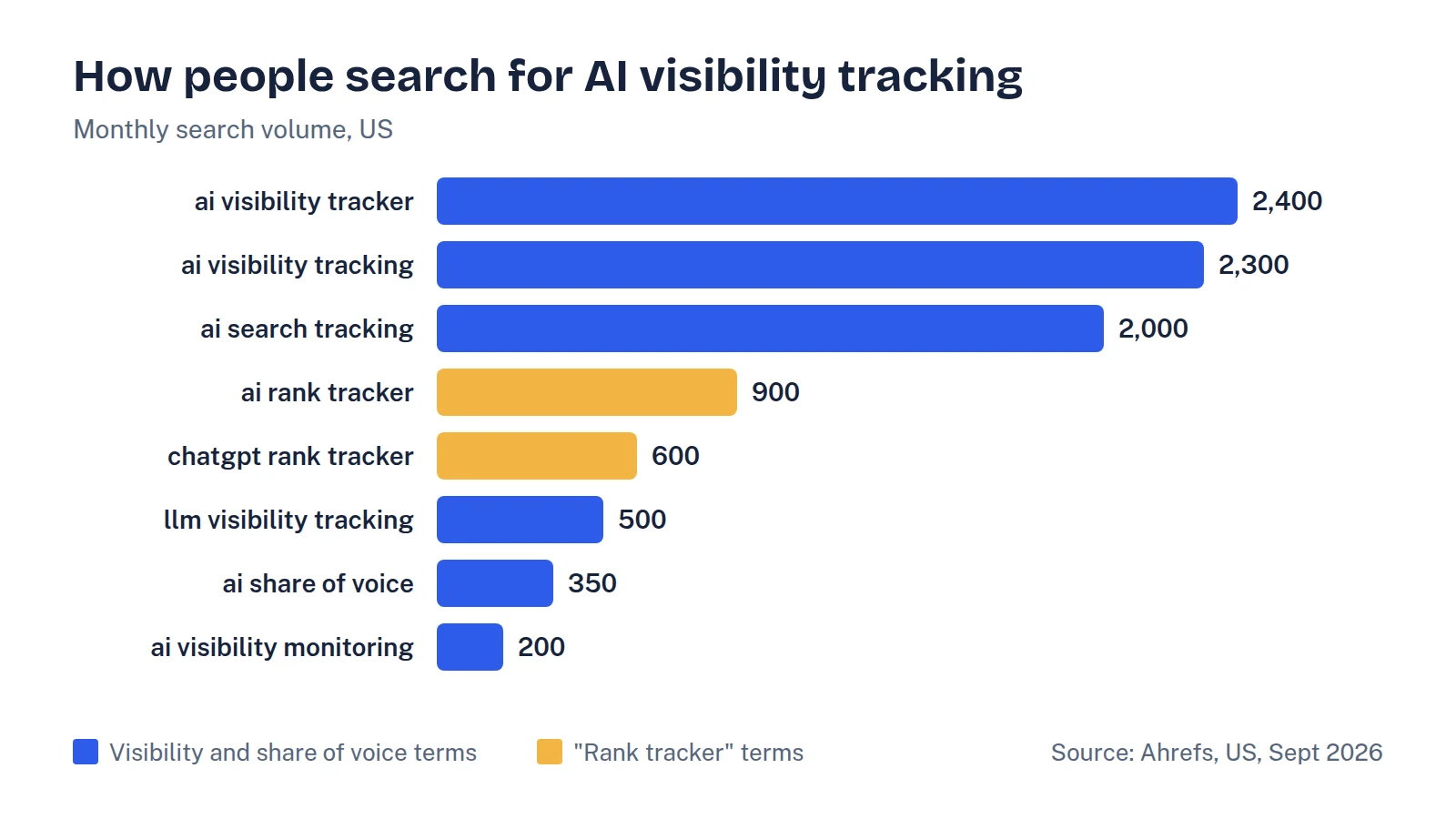
It is not rank tracking, even though many people search for it that way. In our keyword pull for this guide (Ahrefs, US, September 2026), "ai visibility tracking" had about 2,300 monthly searches and "ai visibility tracker" about 2,400, while "ai rank tracker" (900) and "chatgpt rank tracker" (600) added another 1,500. The demand is real, but the rank framing doesn't fit how AI answers work.
SparkToro and Gumshoe.ai had 600 volunteers run the same prompts 2,961 times across ChatGPT, Claude and Google's AI. There was less than a 1 in 100 chance of getting the same brand list twice, and less than 1 in 1,000 of getting the same order. Their conclusion: visibility percentage across many prompts, run many times, is a reasonable metric. Position is not.
So the unit of tracking is a rate: how often you appear across a sample of answers. If you're new to the concept, start with our explainer on what AI visibility is, then come back here to set up the program.
Step one: build a prompt set that mirrors real buying
Your prompt set decides whether the numbers mean anything. A good one reflects the questions real buyers ask at each stage, in their words, not your marketing copy.
Group prompts into buckets so you can report on each separately:
- Category: "best [category] software for [company type]"
- Problem: "how do I [solve the job your product does]"
- Comparison: "[competitor A] vs [competitor B]", "[you] vs [competitor]"
- Alternatives: "alternatives to [competitor]"
- Fit: "is [you] good for [use case or team size]"
Keep branded prompts (anything with your name in it) to a small share and report them separately. Assistants almost always mention you when asked about you by name, so mixing them in inflates the headline number.
Where do prompts come from? Sales call notes, the questions prospects ask in demos, your own search console queries, People Also Ask boxes and question keywords in a tool like Ahrefs. Customer interviews are the best source, because SparkToro found that people phrase the same need in wildly different ways: 142 respondents wrote 142 nearly unique prompts.
For most B2B SaaS teams, 30 to 60 unbranded prompts is enough to start. Freeze the set for at least a quarter. If you change prompts every month, you can't tell whether a change in the numbers came from your work or from the new questions.
Step two: pick engines, runs and cadence
Track the assistants your buyers actually use. For most B2B SaaS companies that means ChatGPT, Google AI Overviews and AI Mode, Perplexity and Gemini. Add Claude or Copilot if your audience skews technical or Microsoft-heavy.
Because answers vary so much, run each prompt several times per cycle, ideally in clean sessions without personal memory or custom instructions. Three runs per prompt per engine is a practical minimum for manual tracking. Tools can do far more.
Cadence depends on how you'll use the data:
- Monthly works for most teams. It's frequent enough to spot movement and gives changes time to register.
- Weekly makes sense during a launch, a rebrand or a big PR push, or when you're using a tool that runs prompts automatically.
- Quarterly is the right rhythm for re-checking the prompt set itself and the competitors you benchmark against.
Citation sources move quickly too. Semrush tracked 230,000 prompts over 13 weeks and saw Reddit's share of ChatGPT citations fall from about 60% to about 10% within weeks. A single snapshot can mislead you for months.
Step three: choose the metrics that matter
You need a handful of metrics, each tied to a decision. Here's the set we recommend, with how to calculate each one.
| Metric | How to calculate it | What it tells you |
|---|---|---|
| Mention rate | Answers that mention you ÷ total answers (unbranded prompts only) | How often you're in the conversation at all |
| Recommendation rate | Answers that recommend you for the prompt's use case ÷ total answers | How often you make the shortlist, not just the list |
| Share of voice | Your mentions ÷ all mentions of you and tracked competitors | Your position in the category relative to rivals |
| Citation share | Answers citing one of your pages ÷ answers with citations | Whether your own content is used as a source |
| Top cited sources | Most frequently cited third-party URLs across all answers | Where to focus PR, reviews and outreach next (see how to earn AI brand mentions) |
| Accuracy score | Answers that describe you correctly (category, audience, key facts) ÷ answers that mention you | Whether mentions help or mislead buyers |
| AI referral sessions | Sessions from AI assistants in your analytics | Whether visibility turns into visits |
A worked example
Say you track 40 unbranded prompts across three engines, three runs each. That's 360 answers per cycle. If you appear in 90 of them, your mention rate is 25%. If you're actively recommended for the right use case in 54, your recommendation rate is 15%. If your four tracked competitors are mentioned 270 times in total, your share of voice is 90 ÷ (90 + 270) = 25%.
These are illustrative numbers, but the arithmetic is the point. Report the rates by bucket and by engine, not just the total. "We're at 40% on comparison prompts but 8% on problem prompts" is a far more useful finding than a single blended score.
Step four: connect visibility to traffic and pipeline
Leadership will ask whether any of this turns into revenue. You won't get perfect attribution, but you can get useful signals:
- ChatGPT referrals. OpenAI's publisher FAQ says ChatGPT automatically adds
utm_source=chatgpt.comto referral links. Build a segment for it in your analytics. - Other assistants. Create a custom channel group for referrers such as perplexity.ai, gemini.google.com and copilot.microsoft.com so AI traffic isn't buried in generic referral.
- Google's AI features. Google says traffic from AI Overviews and AI Mode is included in the overall "Web" search type in Search Console. It isn't broken out separately, so watch trends on the queries where you know AI Overviews appear.
- Self-reported attribution. Add "ChatGPT or another AI assistant" as an option in your "How did you hear about us?" field on demo and signup forms. A buyer who reads an AI answer and later searches for you by name shows up as branded search, not as an AI referral, so this field often catches what analytics misses.
See your own AI visibility, free
Get a one-page audit of how ChatGPT, Perplexity and Gemini treat your brand against up to three competitors, plus your biggest gap. In your inbox within 48 hours.
Get my free auditStep five: report it to leadership
Executives don't need 360 rows of answers. They need to know where you stand, whether it's improving, and what you're doing about it. A one-page monthly report covers it:
- Headline numbers. Mention rate, recommendation rate and share of voice, with the change since last month and last quarter.
- Competitive position. Share of voice for you and your three to five main competitors, shown as a simple bar or trend chart.
- By bucket and engine. A small grid showing where you're strong and where you're missing, so the gaps are obvious.
- Accuracy flags. Any answers that describe you wrongly, with the likely source.
- Business signals. AI referral sessions, demo requests from AI referrals, and self-reported AI attribution.
- What we did and what's next. Three actions taken last month and three planned, each linked to a gap in the data.
Set expectations early. Because individual answers are so variable, month-to-month changes of a few points may be noise. Look for movement that holds across two or three cycles before calling a win or a problem.
Manual tracking or a tool?
You can run all of this by hand with a spreadsheet, and it's worth doing once so you understand the data. Our free AI visibility check gives you a step-by-step method and a template layout.
Manual tracking gets painful quickly, though. Forty prompts, four engines and three runs is 480 answers a month to collect and score. Once you're past a baseline, or need weekly data, a dedicated tracker is usually worth the cost in saved time. Our comparison of the best AI visibility tools covers what each one does well and when manual is still enough.
Whichever route you choose, the fundamentals don't change: a fixed prompt set built from real buyer questions, repeated runs, rates instead of ranks, and a short report tied to actions. For a broader view of the metrics, see our guide to LLM visibility.
FAQ
How often should I track AI visibility?
Monthly suits most B2B SaaS teams. Switch to weekly during launches or big PR pushes, and review the prompt set and competitor list quarterly.
How many prompts do I need to track?
Start with 30 to 60 unbranded prompts that reflect real buyer questions, grouped by category, problem, comparison, alternatives and fit. Run each one several times per engine, because a single answer is too variable to rely on.
Can I track my ranking position in ChatGPT?
Not meaningfully. SparkToro's research found the same brand order came back in fewer than 1 in 1,000 runs. Track how often you're mentioned and recommended across many runs instead.
Does Search Console show AI Overviews traffic?
Google includes clicks from AI Overviews and AI Mode in the overall Web search type in Search Console, but doesn't report them separately. Watch trends on queries where you know AI features appear.
Why should I track AI brand visibility at all?
Buyers increasingly get a shortlist from an AI assistant before they visit any site. If you're missing from those answers, pipeline slows without an obvious cause in your analytics. Tracking shows you where you're missing and whether your fixes work.