Free AI visibility checker: how to check your brand by hand in an afternoon

You don't need a paid AI visibility checker to find out whether ChatGPT, Perplexity, Gemini and Google's AI Overviews recommend you. Twenty buyer prompts, four assistants, clean sessions and one spreadsheet will show your mention rate, share of voice, cited sources and accuracy in about an afternoon. Here is the exact method and template.
- A manual check measures the same things as a paid AI visibility checker: mention rate, share of voice, cited sources and accuracy.
- Use 20 prompts across five intent groups, three or four assistants and clean, unpersonalized sessions.
- Log one row per answer, then score mention rate and share of voice on unbranded prompts only.
- Ignore the order brands appear in. Answers change almost every run, so the share of answers you appear in is what matters.
- Move to a tool when you need trends, more than about 50 prompts, or a recurring report.
What an AI visibility checker actually measures
Every AI visibility checker, free or paid, is answering the same four questions about your brand across a set of prompts:
- Mention rate: in what share of answers does your brand appear at all?
- Share of voice: how often do you appear compared with the competitors named in the same answers?
- Citations: which pages do the assistants link to as sources, and are any of them yours or about you?
- Accuracy: when you are mentioned, is the description right, for the right use case and buyer?
Tools automate the prompting and counting. A manual check does the same work by hand, which is slower but has two advantages: it costs nothing, and you read every answer yourself, so you notice things a dashboard score hides, like being recommended for the wrong use case.
There is clearly demand for a quick answer. We pulled the numbers in Ahrefs (US, September 2026): "ai visibility checker" gets about 1,900 searches a month with a keyword difficulty of 12, and close variants add hundreds more.
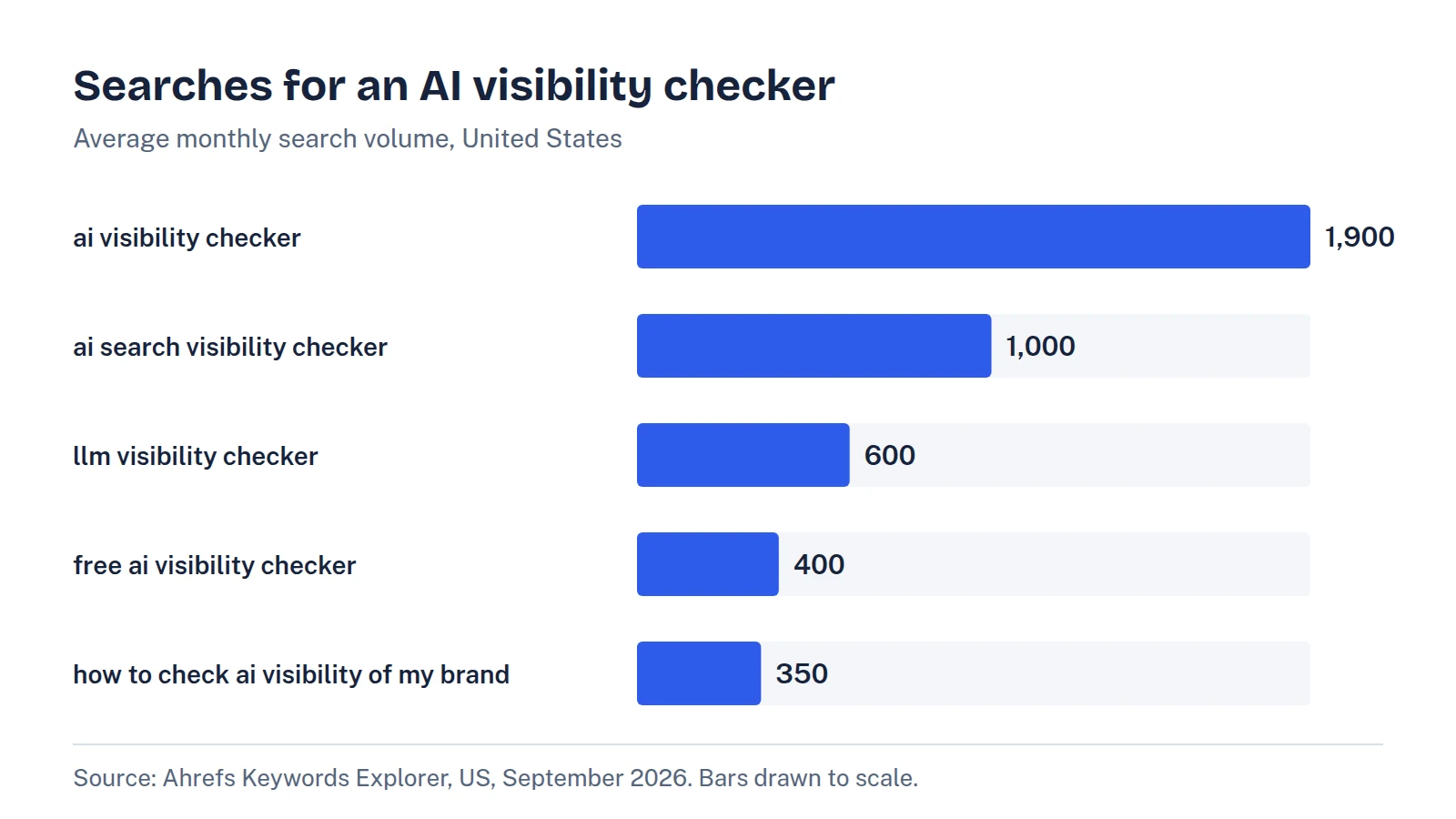
What those searchers find is almost entirely tools. In the same Ahrefs SERP snapshot, all nine distinct pages in the organic top 10 for "ai visibility checker" are free tool landing pages, most of them lead magnets for a paid product. None of them show you how to run the check yourself, which is what this guide does.
Free AI visibility checker tools vs a manual check
Free tools are a good first look. Run one before you start, because it takes a couple of minutes and gives you a rough baseline to compare with. Here is what three of the top-ranking free checkers say they cover, based on their own pages as of September 2026:
| Option | What you enter | Assistants covered | What you get |
|---|---|---|---|
| Ahrefs free AI visibility checker | Brand name | ChatGPT, Gemini, Perplexity, Copilot, Google AI Overviews | Total mentions, mentions by platform, top 5 topics, top 5 cited domains and pages |
| SEO Review Tools AI visibility tracker | Brand or URL, up to 10 products, up to 5 competitors | Gemini, ChatGPT, Perplexity | Brand description, visibility, sentiment and credibility scores, related prompts, competitor view |
| Amplitude AI visibility report | Brand details via a form | ChatGPT, Google AI Overviews and others | Visibility score, sentiment, competitive rankings, recommendations |
| Manual check (this guide) | Your own prompt set | Whichever assistants your buyers use | Mention rate, share of voice, cited sources and accuracy notes on the prompts you care about |
The limit of free tools is control. You usually can't choose the exact prompts, you get a snapshot rather than a trend, and a single score doesn't tell you why you're missing. A manual check fixes all three, as long as you're disciplined about the setup.
Set up the spreadsheet template
Create one sheet called Log with one row per answer (one prompt, on one assistant, on one run). Keep it flat; you'll summarize it later with a pivot table or a few COUNTIFS formulas.
| Column | What to record | Example |
|---|---|---|
| Prompt ID | A short code so reruns line up | C03 |
| Prompt | The exact wording, never edited after day one | best onboarding software for a 200-person company |
| Intent | Category, Problem, Comparison, Alternatives or Branded | Category |
| Assistant | ChatGPT, Perplexity, Gemini or AI Overviews | Perplexity |
| Run date | Date of the check | 2026-09-25 |
| You mentioned? | 1 or 0 | 1 |
| Brands named | Every brand in the answer, comma-separated | You, Competitor A, Competitor B |
| Cited URLs | Source links shown with the answer | g2.com/categories/… |
| Accuracy note | Anything wrong or off-target about how you're described | Called us "for small teams" only |
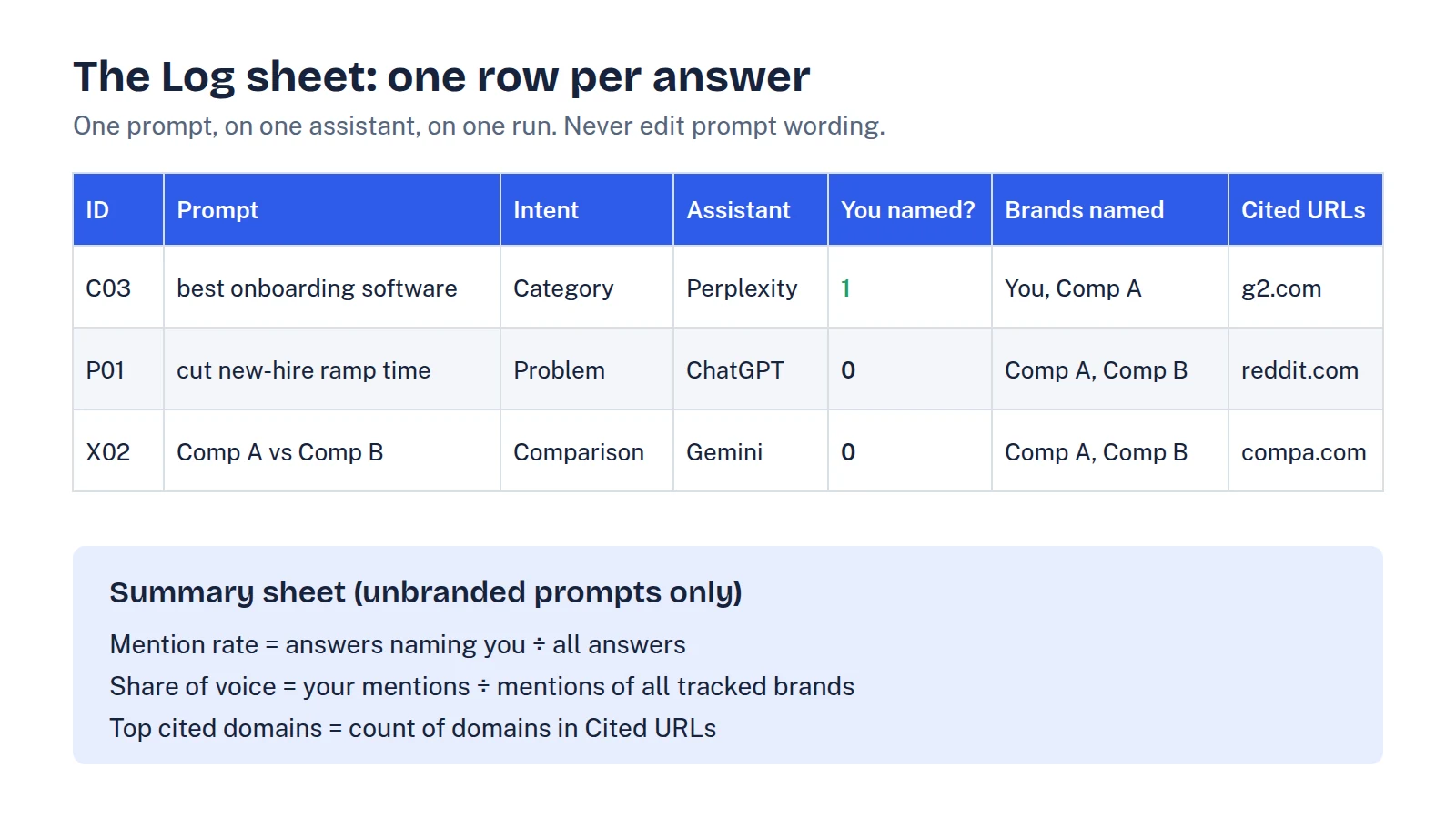
Add a second sheet called Summary once the log is full. That's where the scoring in the next section lives.
How to check your AI visibility for free, step by step
Budget three to four hours for a first pass. The time goes into running prompts and copying brand names, so it's worth doing in one sitting while the setup is fresh.
- Write 20 prompts in five groups. Use four each of category prompts ("best X software for Y"), problem prompts ("how do I fix Z"), comparison prompts ("X vs Y"), alternatives prompts ("alternatives to Competitor A") and branded prompts ("what is YourBrand", "is YourBrand good for Y"). Phrase them the way a buyer would, not the way your homepage talks. Sales call notes and support tickets are the best source.
- Pick three or four assistants. ChatGPT and Google AI Overviews for most B2B SaaS teams, then Perplexity and Gemini. If you know your buyers use Copilot or Claude, add those instead. For Google, you're checking whether an AI Overview appears and who it names; Google doesn't break AI Overview traffic out separately, since it reports clicks from AI features inside the "Web" search type in Search Console.
- Use clean sessions. In ChatGPT, start a Temporary Chat and choose the unpersonalized option, which OpenAI says doesn't use memory or custom instructions. Use a logged-out or private browser window for Perplexity and Google. Don't run prompts from an account that has spent weeks talking about your own product.
- Run every prompt once on every assistant and log it. Twenty prompts on four assistants is 80 rows. Record every brand named, not just yours, and paste the cited URLs. Open a few of them: OpenAI itself notes that ChatGPT search citations can be incomplete, outdated or incorrect, and an outdated source is often the cause of an outdated description.
- Rerun a sample to see the noise. Pick five category prompts and run them two more times on ChatGPT. You'll see the list change, which is normal. SparkToro's research across 2,961 runs found less than a 1 in 100 chance that ChatGPT or Google's AI returns the same brand list twice for the same prompt.
- Read your branded answers closely. For the branded group, you already know you'll be mentioned. What you're checking is whether the facts, pricing model, category and target customer are right.
- Fill the Summary sheet and save a dated copy. The copy is your baseline. Next month you rerun the same prompts and compare.
How to score the results
Keep the scoring simple enough that you'll repeat it. Leave your branded prompts out of mention rate and share of voice, since they inflate both.
- Mention rate = unbranded answers that mention you ÷ all unbranded answers. In Sheets:
=COUNTIFS(Log!C:C,"<>Branded",Log!F:F,1)/COUNTIFS(Log!C:C,"<>Branded"). - Share of voice = your mentions ÷ mentions of all brands you track (you plus three to five named competitors) in the same unbranded answers.
- Mention rate by assistant and by intent. A pivot table with Assistant or Intent as rows and the average of "You mentioned?" as the value. This is where the useful patterns show up.
- Top cited domains. Split the Cited URLs column to domains and count them. The top ten are the sites shaping answers in your category.
- Accuracy issues. Count distinct problems, not rows. One wrong pricing claim repeated in eight answers is one fix.
A worked example
Here is how the math works with hypothetical numbers. You run 16 unbranded prompts on four assistants, which gives 64 answers. You appear in 16 of them, so your mention rate is 25%. Across those same 64 answers, your four tracked competitors are named 104 times in total and you're named 16 times, so your share of voice is 16 ÷ 120, or about 13%. If the pivot shows you in 9 of 16 Perplexity answers but only 1 of 16 ChatGPT answers, that gap is the first thing to investigate.
What your results tell you, and what to do next
A first check usually lands in one of four patterns. Each points to a different fix.
- Missing from category and alternatives prompts, fine on branded ones. The assistants know who you are but don't think of you when buyers ask about the category. The fix is usually third-party presence: the comparison pages, review sites and community threads they cite. Our guide to earning more AI brand mentions covers where to start.
- Mentioned, but described wrongly. Wrong category, outdated pricing, the wrong buyer. That's a positioning and brand-facts problem, covered in fixing how AI assistants describe your brand.
- Strong on one assistant, weak on another. Compare the cited domains for each. Assistants that search the web draw on different sources, so the gap often traces back to a handful of pages one of them cites and the other doesn't.
- Competitors dominate the cited sources. Your top-cited domains list is your outreach list. Ask to be added or updated on the pages that appear most often.
See your own AI visibility, free
Get a one-page audit of how ChatGPT, Perplexity and Gemini treat your brand against up to three competitors, plus your biggest gap. In your inbox within 48 hours.
Get my free auditWhen a free check stops being enough
A manual check works well for a baseline and for a quarterly health check. It starts to strain in three situations:
- You need a trend, not a snapshot. Because answers vary so much run to run, month-over-month changes of a few points in a 64-answer sample are within the noise. Reliable trends need many more runs than you'll want to do by hand.
- Your prompt set grows past about 50 prompts, or you need several countries or languages.
- Leadership wants a recurring report. At that point the time cost of manual logging usually exceeds the cost of a tool.
When you reach that point, our comparison of AI visibility tools covers what the main options track and cost, and the guide to setting up ongoing AI visibility tracking covers cadence and reporting. Keep your 20-prompt sheet either way. It's the easiest way to sanity-check what any tool tells you, and if you want the bigger picture of what you're measuring, start with our LLM visibility primer.
FAQ
How can I check the AI visibility of my brand for free?
Run a fixed set of about 20 buyer prompts in ChatGPT, Perplexity, Gemini and Google, using clean sessions, and log every brand named and every source cited in a spreadsheet. Free tools such as the Ahrefs AI visibility checker give a quick first snapshot you can compare against.
What is an LLM visibility checker?
It's a tool or method that measures how often large language model assistants mention and cite your brand for questions in your category. Most report mentions, share of voice against competitors and the pages cited as sources.
Are free AI visibility checkers accurate?
They're useful for a first look, but most give a one-off snapshot on prompts you don't choose. Because AI answers vary from run to run, treat any single score as a rough indicator and confirm it on your own buyer prompts.
How often should I rerun a manual check?
Monthly or quarterly with exactly the same prompts works for most teams. Changing the wording between checks makes the results impossible to compare.
Sources
- SparkToro: AIs are highly inconsistent when recommending brands or products
- OpenAI Help Center: Temporary Chat FAQ
- OpenAI Help Center: ChatGPT search
- Google Search Central: AI features and your website
- Ahrefs: Free AI visibility checker
- SEO Review Tools: AI visibility tracker
- Amplitude: Free AI visibility report