SaaS pricing page guide: how to make your pricing clear to buyers and AI assistants

A good SaaS pricing page states every plan's price, unit, billing period and audience in plain HTML text, so both buyers and AI assistants can quote it correctly. With 82% of B2B buyers now sourcing software recommendations from AI chatbots, unclear pricing costs you shortlist spots. This guide gives you a checklist, a consistency audit and a monthly test.
- G2 found 82% of B2B buyers sourced software recommendations from an AI chatbot in the last 24 months, so assistants read your pricing before many buyers do.
- Put every price in the page's HTML, with one plain sentence per plan: name, price, unit, billing and audience.
- Name your value metric and give "contact sales" a reason or a starting point.
- Keep review profiles, docs and old posts consistent with the pricing page; assistants quote whichever source they find.
- Test the same pricing prompts in ChatGPT, Gemini, Perplexity and AI Overviews every month and trace wrong answers to their source.
Why your SaaS pricing page now has two audiences
For years the pricing page had one job: convert a visitor who was already interested. A buyer landed, compared tiers, and either started a trial or booked a call. That job hasn't gone away, but the page now gets read by a second audience before most buyers ever arrive: AI assistants answering questions like "how much does [your product] cost?" or "cheapest [category] tool for a 20-person team".
The shift in buyer behavior is well documented. In G2's 2026 Buyer Behavior Report, a survey of more than 1,000 B2B software buyers, 82% said they had sourced software recommendations from an AI chatbot in the last 24 months. Price is one of the first things those buyers ask about. When the answer is vague, wrong or missing, you lose the shortlist before your page gets a visit.
Buyers also want to serve themselves. TrustRadius found that 81% of buyers want to find pricing information on their own, and 71% said readily available pricing on a vendor's website would make them more likely to buy (TrustRadius, 2022 B2B Buying Disconnect data). In its January 2025 survey of 2,058 tech buyers, pricing transparency was the number one change buyers wanted from vendors, cited by 45% (EMARKETER, citing TrustRadius).
So a SaaS pricing page has to do three things at once: convert humans, give assistants facts they can repeat accurately, and match what third-party sites say about you.
What people search for, and what the top results miss
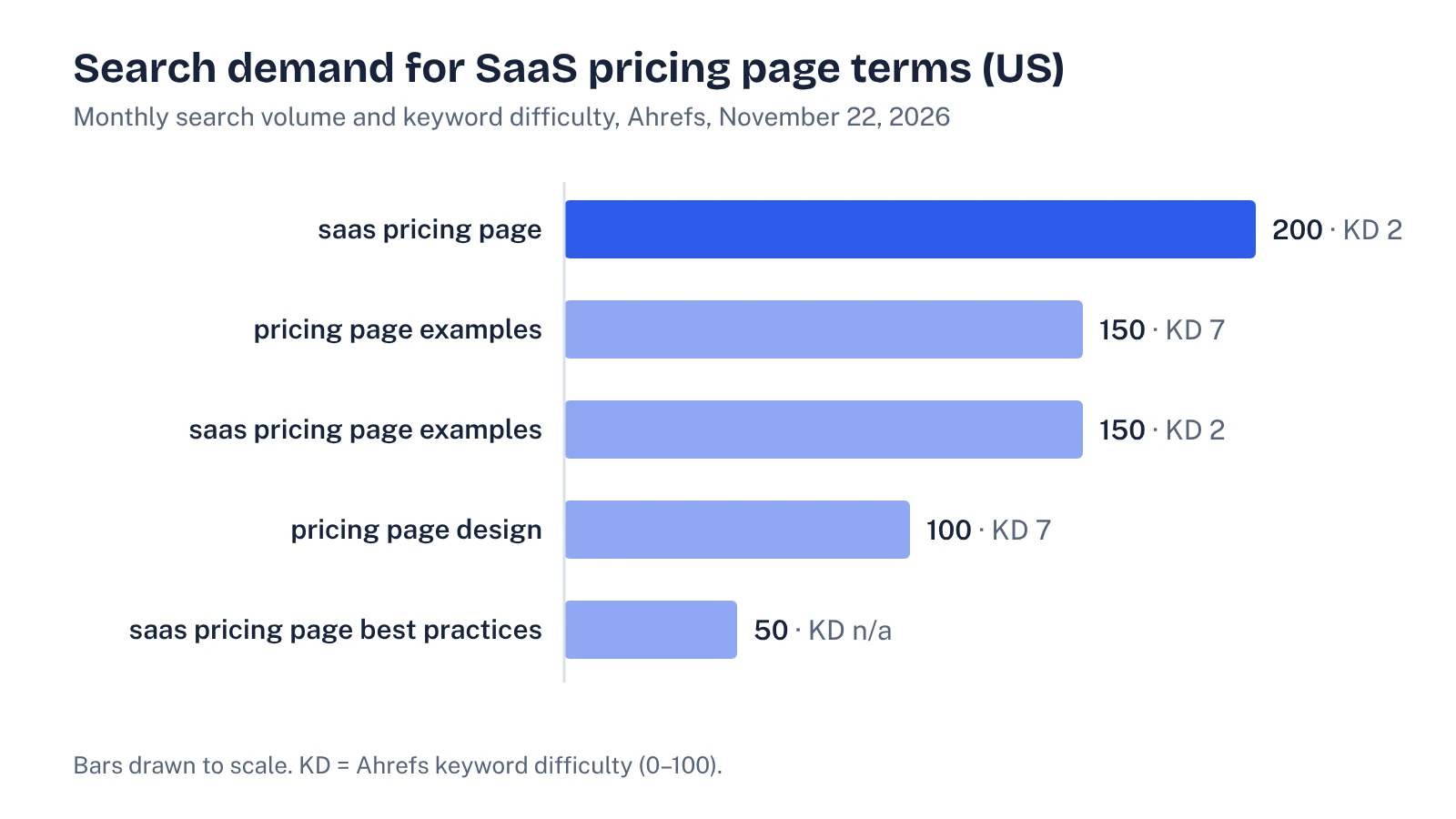
We pulled US data from Ahrefs Keywords Explorer on November 22, 2026. Demand is modest but almost uncontested, and the head term already shows an AI Overview.
| Keyword (US) | Monthly volume | Keyword difficulty | AI Overview on the SERP? |
|---|---|---|---|
| saas pricing page | 200 | 2 | Yes |
| pricing page examples | 150 | 7 | Yes |
| saas pricing page examples | 150 | 2 | No |
| pricing page design | 100 | 7 | Yes |
| saas pricing page best practices | 50 | n/a | No |
The top ten for "saas pricing page" is mostly design galleries and "best examples" roundups, plus Reddit threads and a Dribbble tag page. They are useful for layout ideas. None of them asks whether an AI assistant can read the page and quote your prices correctly, which is the gap this guide fills.
What an AI assistant needs from a pricing page
Assistants that browse the web read your page as text. They can't hover a tooltip, flip a monthly/annual toggle, or open a "compare all features" accordion that loads only after a click. Whatever they can't see, they fill from elsewhere: a review site, an old blog post, a competitor's comparison page, or their training data.
That gives you a simple test. Pretend the page is printed on paper. Can a stranger answer these questions from the printout alone?
- What are the plans called, and who is each one for?
- What does each plan cost, in which currency, per what unit (seat, account, usage), and billed how?
- What is the value metric that makes the price go up?
- Is there a free plan or a trial, and what are its limits?
- What is included in each tier, and what is the one feature that usually forces an upgrade?
- If a plan says "contact sales", what is it for and roughly where does it start?
- When was this pricing last updated?
If the answer to any of these depends on JavaScript state, an image, or a sales call, assume an assistant will either skip it or guess.
The AI-readable SaaS pricing page checklist
Work through these in order. The first four fix most of the problems we see when we test how assistants describe a product's pricing.
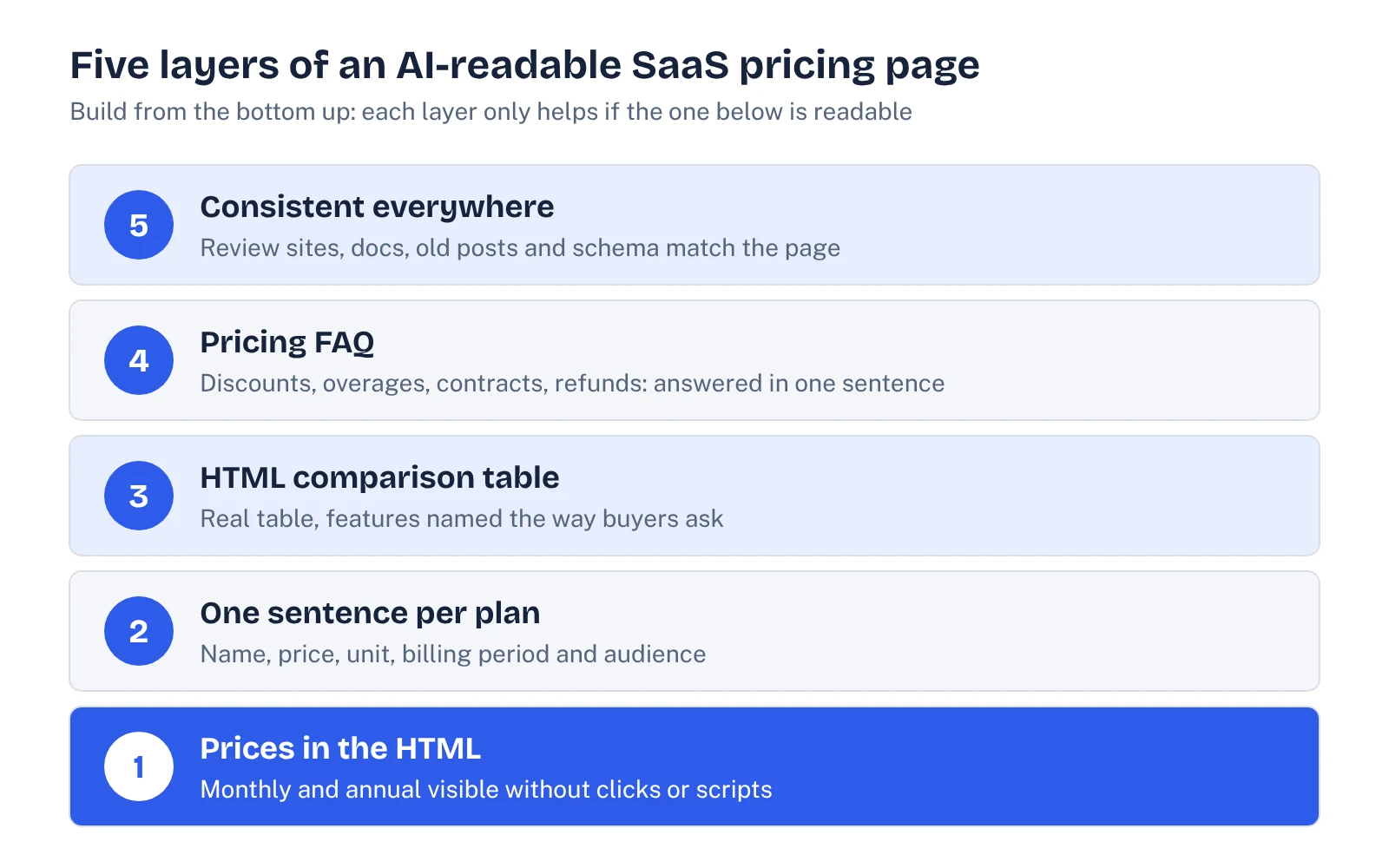
- Put every price in the HTML. Monthly and annual prices should both be present in the page source, not swapped in by a toggle after load. Check with "view source" or a text-only fetch. If your site blocks AI crawlers by accident, nothing else here matters; our guide to AI crawlers and robots.txt covers what to allow.
- Write one plain sentence per plan. For example: "Team costs $49 per user per month, billed annually, and is for companies that need SSO and shared workspaces." Name, price, unit, billing, audience. That sentence is what an assistant is most likely to lift.
- Name your value metric. Say clearly what makes the bill grow: seats, contacts, events, API calls, credits. This matters more each year. G2 reports that half of buyers have already been offered a variable-cost pricing option and another 42% expect one soon. If you price on usage, publish the unit and a worked example.
- Give "contact sales" a starting point or a reason. If you can't publish an enterprise price, say what triggers it (for example, "over 500 seats, custom data residency, or a signed DPA") and, if you can, a "starts at" figure. A bare "contact us" leaves the assistant to quote a review site, which may be years out of date.
- Keep the comparison table in HTML. Feature grids rendered as images or built only inside a modal are invisible to text readers. Use a real table with row labels written the way buyers ask ("SSO", "audit log", "API access"), not internal feature names.
- Add a pricing FAQ with direct answers. Cover discounts for nonprofits or startups, overage charges, contract length, cancellation, refunds and currency. Answer in the first sentence.
- Show a "last updated" date. It helps assistants and humans judge freshness, and it reminds your team to review the page when pricing changes.
- Mark it up honestly. Structured data won't make an assistant trust a page, but it removes ambiguity. Google's SoftwareApplication documentation lists
offers.priceas required (use 0 for free) and recommendspriceCurrencywhen the price is above zero. Only mark up prices that are visible on the page. Our schema markup for AI search guide explains where it helps and where it doesn't.
Make every other source say the same thing
Your pricing page is one source among many. Assistants also read review profiles, marketplace listings, help-center articles, old launch posts and third-party comparison pages. When those disagree, you can't control which version gets repeated.
Review sites are the biggest risk. G2 noted in 2025 that only 4% of its product profiles explicitly listed prices (G2 Learn Hub). That means most profiles either show nothing or show a "contact us" button, and assistants that cite those profiles have little to go on. Update the pricing fields on the review sites your buyers use; our guide to B2B review sites and AI visibility lists which ones tend to get cited.
| Source | What to check | How often |
|---|---|---|
| Your pricing page | All prices in HTML, plan sentences, last-updated date | Every pricing change |
| Review site profiles (G2, Capterra, TrustRadius) | Pricing fields filled, tiers named the same way | Quarterly |
| Help center and docs | Plan limits and billing articles match the page | Every pricing change |
| Old blog posts and launch announcements | Outdated prices removed or marked as historical | Twice a year |
| App marketplaces and integration listings | Listed price and plan names current | Quarterly |
| AI assistant answers | Price quoted for your product and top competitors | Monthly |
Retire old pricing properly. A 2023 announcement post that still says "$29/month" can outlive your current pricing in AI answers for a long time. Edit the figure, add a dated note, or redirect it to the current pricing page.
See your own AI visibility, free
Get a one-page audit of how ChatGPT, Perplexity and Gemini treat your brand against up to three competitors, plus your biggest gap. In your inbox within 48 hours.
Get my free auditHow to test what AI assistants say about your pricing
You don't need a tool to start. Set aside 30 minutes a month and run the same prompts each time so the results are comparable.
- Write 6 to 10 prompts. Mix branded ("How much does [product] cost per user?"), comparative ("[product] vs [competitor] pricing for a 50-person team") and unbranded ("affordable [category] software with SSO").
- Run them in the assistants your buyers use. Usually ChatGPT, Gemini, Perplexity and Google's AI Overviews. Use a logged-out or fresh session where possible.
- Record four things per answer. The price quoted, whether it is current, which source was cited, and whether a competitor was framed as cheaper.
- Trace every wrong answer to its source. If the citation is an old review profile or blog post, fix that page first. If there's no citation, the assistant is guessing, which usually means your own page isn't clear enough.
- Re-test after each fix. Changes can take weeks to show, so compare month to month rather than day to day.
This is the pricing slice of a broader check. If you want the full version, with prompt sets, scoring and a spreadsheet, see our step-by-step AI visibility audit guide.
Common SaaS pricing page mistakes that confuse assistants
Prices that only exist behind a toggle
If annual prices load only after a click, an assistant may quote the monthly price as if it were annual, or the reverse. Show both, or state the billing period next to every number.
Plan names that mean nothing out of context
"Rocket" and "Galaxy" might fit your brand, but on their own they tell a reader nothing. Pair each name with its audience: "Growth (for teams of 10 to 50)".
Important limits buried in footnotes
Seat minimums, annual-only plans and usage caps change the real price. Put them next to the price, not in an asterisk at the bottom of the page.
Credits with no conversion
Credit-based and AI-usage pricing is spreading. G2 found buyer preference for outcome-based pricing more than doubled from 11% in 2025 to 23% in 2026. If you sell credits, say what one credit buys in plain terms, or assistants will describe your product as "expensive" or "unclear".
Where to start this week
Pick the one change with the biggest gap. For most B2B SaaS teams that's getting every price into the HTML and writing a plain sentence for each plan. Then fix the review profiles that assistants cite most for your category, and run your first round of pricing prompts so you have a baseline.
A pricing page that an assistant can read in one pass is also one a busy buyer can read in one pass. You rarely have to choose between the two audiences. Clear beats clever for both. For the wider picture of how assistants choose which brands to recommend, read how to rank in ChatGPT.
FAQ
What should a SaaS pricing page include?
Plan names with the audience each one is for, the price, the unit (seat, account or usage), the billing period, what each tier includes, free plan or trial limits, and a pricing FAQ. Put all of it in HTML text rather than images or click-to-reveal elements.
Should B2B SaaS companies publish prices at all?
Buyers clearly prefer it: TrustRadius found 81% want to find pricing on their own. If you can't publish enterprise prices, publish self-serve tiers and give the enterprise plan a starting point or a clear reason to contact sales.
Does schema markup help AI assistants read pricing?
It can reduce ambiguity, but it doesn't replace visible text. Google's SoftwareApplication markup requires offers.price, and you should only mark up prices that are shown on the page.
How do I check what ChatGPT says about my pricing?
Run a fixed set of branded, comparative and unbranded pricing prompts each month, record the price quoted and the cited source, and fix the source behind any wrong answer.
Sources
- G2: New G2 Research: AI Is Reshaping How B2B Software Deals Are Won and Lost (2026 Buyer Behavior Report, July 22, 2026)
- TrustRadius: Tech buyers demand honest and up-front pricing info (2022 B2B Buying Disconnect data)
- EMARKETER: B2B tech buyers crave pricing transparency (citing TrustRadius, January 2025 survey)
- G2 Learn Hub: Is B2B Software Pricing Transparency Broken? (August 28, 2025)
- Google Search Central: Software app (SoftwareApplication) structured data
- Ahrefs Keywords Explorer and SERP overview, US data pulled November 22, 2026