AI crawlers: which bots to allow on your SaaS site (and which to think twice about)
AI crawlers are the bots AI companies use to fetch your pages, and they do three different jobs: training models, building search indexes, and fetching pages when a user asks. For a SaaS site, allow the search and user-triggered bots, and decide training separately. This guide maps every major bot, gives you a robots.txt template, and shows a 30-minute audit.
- OpenAI, Anthropic and Perplexity each run separate bots for training, search and user-triggered fetches, and each is controlled separately.
- Blocking OAI-SearchBot, Claude-SearchBot or PerplexityBot can keep you out of AI answers. Blocking GPTBot or ClaudeBot only opts you out of training.
- Google's AI Overviews and AI Mode use Googlebot. Google-Extended does not affect Search inclusion or ranking.
- Vercel's tests found the major AI crawlers don't execute JavaScript, so client-rendered pricing and feature pages may look empty to them.
- Check robots.txt, your CDN's bot rules and raw HTML on five key pages. It takes about 30 minutes.
What AI crawlers are, and why there are three kinds
An AI crawler is any automated client an AI company uses to fetch your pages. That sounds like one thing. It isn't. Each major vendor now runs separate user agents for separate jobs, and each one is controlled separately in robots.txt.
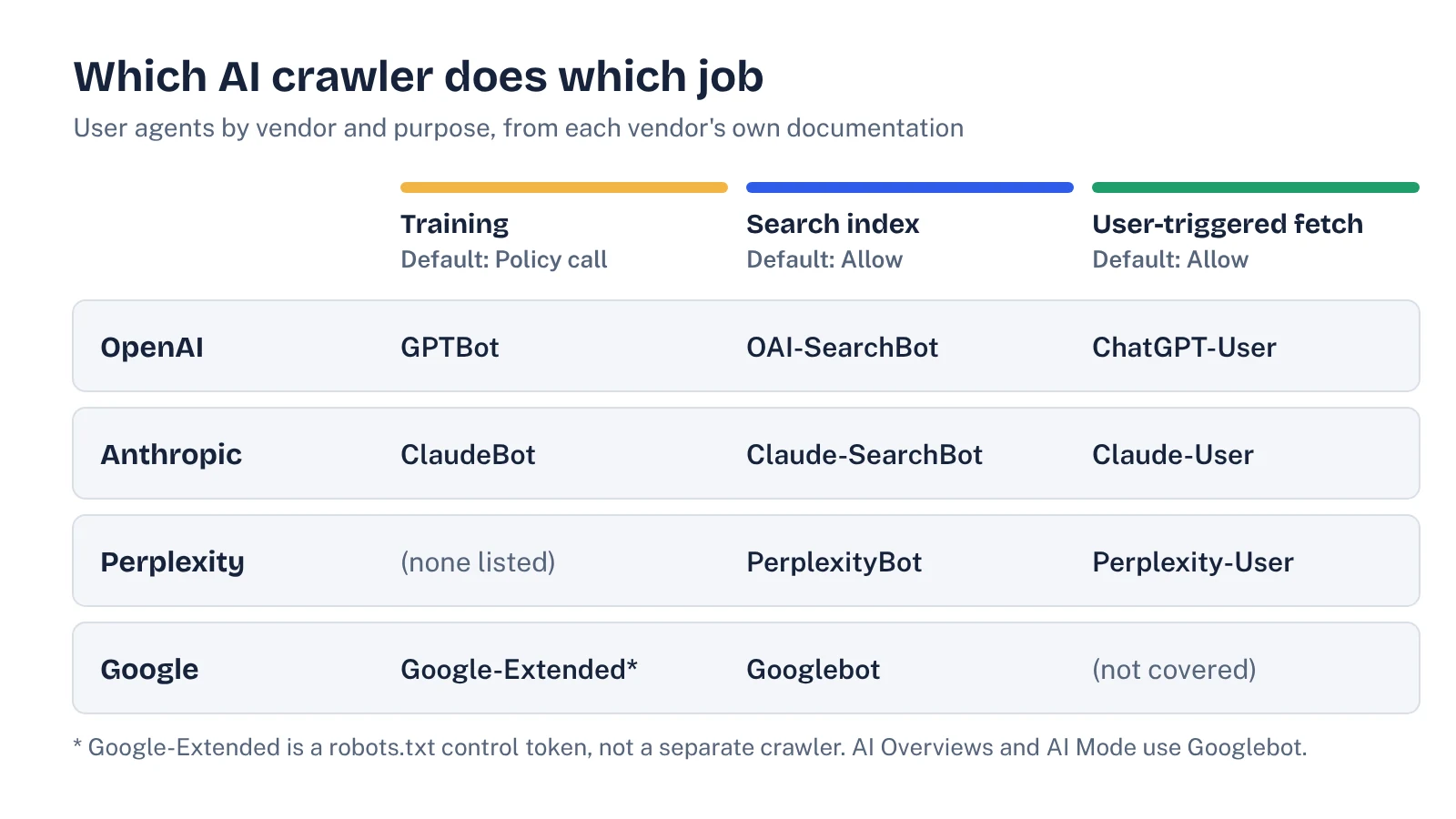
Read the vendors' own documentation and the bots fall into three groups:
- Training crawlers collect content that may be used to train future models. GPTBot (OpenAI) and ClaudeBot (Anthropic) are the main ones. Google uses a separate control token, Google-Extended, for training rather than a separate crawler.
- Search crawlers build the index an assistant searches when it answers with links. OAI-SearchBot (ChatGPT search), Claude-SearchBot and PerplexityBot sit here. For Google's AI Overviews and AI Mode, the crawler is plain Googlebot.
- User-triggered fetchers visit a page because a person asked the assistant something right now. ChatGPT-User, Claude-User and Perplexity-User are the examples. OpenAI and Perplexity both say robots.txt rules may not apply to these, because a human started the request.
The distinction matters because the business trade-off is different for each. Blocking a training crawler is a policy choice about your content. Blocking a search crawler is a visibility choice, and for a B2B SaaS company that wants to be recommended by ChatGPT or Perplexity, it's usually a mistake. (For the Perplexity side in full, see how to rank in Perplexity.)
Search demand shows people are working this out bot by bot. In Ahrefs Keywords Explorer this morning (US, October 16, 2026), "ai crawlers" had about 150 searches a month with a keyword difficulty of 8. "gptbot" had about 350, "oai-searchbot" about 200 and "perplexitybot" about 80. One of the bigger related questions was "can ai crawlers execute javascript" at about 350 a month. We answer that below, because for SaaS sites it's the question that matters most.
The AI crawlers that matter for a SaaS site
This table is built from each vendor's own documentation, which we opened today. It covers the bots that affect whether you appear in AI answers. There are many more crawlers on the web, but these are the ones a SaaS marketing team should make a deliberate decision about.
| User agent | Vendor | Job | What blocking it does | Our default for SaaS |
|---|---|---|---|---|
| OAI-SearchBot | OpenAI | Search index for ChatGPT search | Pages "will not be shown in ChatGPT search answers," though they can still appear as navigational links | Allow |
| GPTBot | OpenAI | Training data | Signals your content should not be used to train OpenAI foundation models | Your policy call |
| ChatGPT-User | OpenAI | Fetches a page when a user asks | robots.txt "may not apply"; not used to decide search inclusion | Allow |
| Claude-SearchBot | Anthropic | Search quality for Claude | Stops indexing for search, which may reduce visibility in Claude's results | Allow |
| ClaudeBot | Anthropic | Training data | Signals future content should be excluded from training datasets | Your policy call |
| Claude-User | Anthropic | Fetches a page when a user asks | Stops Claude retrieving your page in response to a user query | Allow |
| PerplexityBot | Perplexity | Search index for Perplexity | Removes you from the pool Perplexity surfaces and links; Perplexity says it is not used for model training | Allow |
| Perplexity-User | Perplexity | Fetches a page when a user asks | "Generally ignores robots.txt rules" | Allow |
| Googlebot | Search, including AI Overviews and AI Mode | Removes you from Search and its AI features | Allow | |
| Google-Extended | Control token for Gemini training and grounding | Does not affect Search inclusion or ranking, per Google | Your policy call |
Sources: OpenAI crawler overview, Anthropic's crawler help article, Perplexity crawler docs and Google's list of common crawlers.
Allow or block: how to decide
Most of the pages ranking for "ai crawlers" today come from bot-management and security vendors. They're useful if your problem is server load or scraping. They spend less time on the marketing question: which bots do you need in order to be recommended?
For a B2B SaaS company, our rule of thumb is simple. Allow every search crawler and user-triggered fetcher. Treat training crawlers as a separate decision, made by whoever owns your content policy, not by whoever last edited robots.txt.
There are good arguments on both sides of the training question. Allowing it means future models may learn your category, positioning and product names from your own pages. Blocking it keeps your content out of training sets, which some legal and content teams prefer. What the vendor docs make clear is that the decision is independent. OpenAI says "each setting is independent of the others." You can block GPTBot and still allow OAI-SearchBot. Google says Google-Extended "does not impact a site's inclusion in Google Search nor is it used as a ranking signal."
The cost of crawling is real but uneven. Cloudflare's August 2025 analysis found training drove nearly 80% of AI bot crawling in July 2025. It also compared HTML pages crawled with visits referred back. In early August 2025 the ratio was about 118 to 1 for Perplexity, 887 to 1 for OpenAI and nearly 50,000 to 1 for Anthropic. Those numbers explain why publishers block. For a SaaS site with a few hundred pages, the crawl load is rarely the issue. Being left out of the answer is.
A robots.txt template for a SaaS marketing site
Here's a starting point that allows search and user-triggered access and leaves training as an explicit choice. Adapt the paths to your site. Keep login, app and account areas blocked for everyone as you already do.
# Search and AI answer visibility: allow
User-agent: OAI-SearchBot
Allow: /

User-agent: Claude-SearchBot
Allow: /

User-agent: PerplexityBot
Allow: /

User-agent: ChatGPT-User
Allow: /

User-agent: Claude-User
Allow: /

# Training: decide deliberately (shown here as allowed)
User-agent: GPTBot
Allow: /

User-agent: ClaudeBot
Allow: /

User-agent: Google-Extended
Allow: /

# Everyone else
User-agent: *
Disallow: /app/
Disallow: /account/

Sitemap: https://www.example.com/sitemap.xml
One detail catches people out. A crawler follows the most specific group that names it. If you add a User-agent: OAI-SearchBot group, it no longer reads the rules under User-agent: *. Repeat any private-path disallows inside each named group if you need them.
Changes aren't instant. OpenAI says it can take about 24 hours for ChatGPT search to reflect a robots.txt update, and Perplexity says up to 24 hours. Anthropic notes that rules must be set on each subdomain, so check docs., help. and blog. subdomains too.
Can AI crawlers execute JavaScript?
Mostly, no. This is the part that hurts SaaS sites, because many marketing sites, docs portals and pricing pages render content in the browser.
Vercel and MERJ tested the major AI crawlers across Vercel's network (published December 2024). They found that none of the major AI crawlers they tested rendered JavaScript, including OpenAI's crawlers, ClaudeBot and PerplexityBot. ChatGPT's and Claude's crawlers did download JavaScript files, 11.5% and 23.8% of their fetches respectively, but didn't execute them. Gemini, which uses Google's infrastructure, and AppleBot did render JavaScript.
The practical meaning: if your feature list, pricing table or integration directory only appears after client-side JavaScript runs, ChatGPT search and Perplexity may see an empty shell. They can't recommend what they can't read.
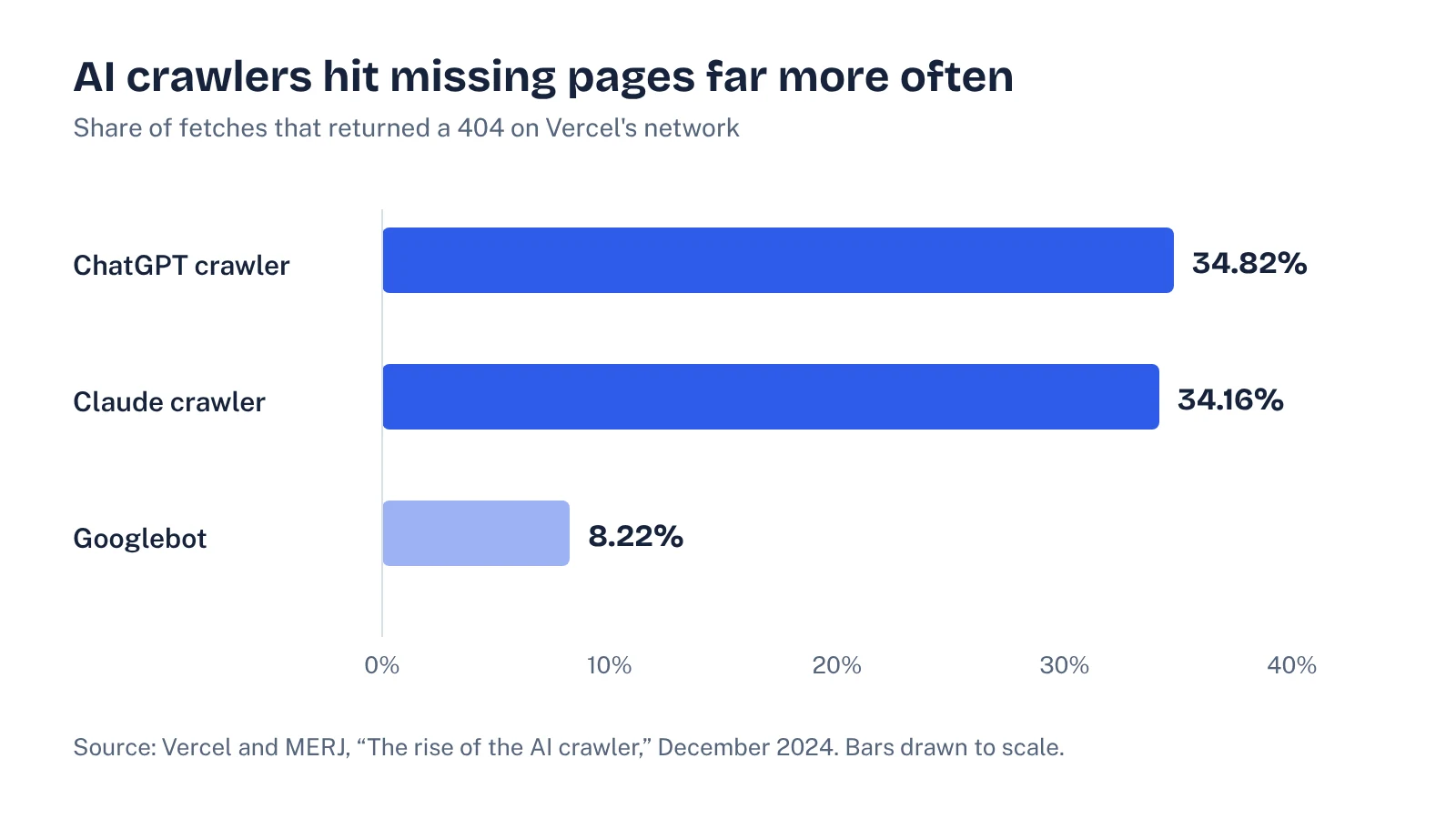
The same study found a lot of wasted crawling. About 35% of ChatGPT's and Claude's fetches hit 404 pages, compared with about 8% for Googlebot. Many were outdated asset URLs. AI crawlers seem less good at keeping track of what still exists, so clean URLs, redirects and sitemaps matter more, not less.
Two quick tests tell you where you stand:
- View source, not inspect. Open a key page, choose "View page source" and search for a sentence from your main copy. If it isn't in the raw HTML, a non-rendering crawler won't see it.
- Fetch it as a bot. Run
curl -A "OAI-SearchBot" https://yoursite.com/pricingand read the output. You'll also catch firewall rules that return a 403 or a challenge page to AI user agents.
If key content fails, ask your developers for server-side rendering or static generation of the main text, headings, pricing and navigation. Vercel's advice is the same: render critical content on the server, and keep client-side rendering for non-essential features.
See your own AI visibility, free
Get a one-page audit of how ChatGPT, Perplexity and Gemini treat your brand against up to three competitors, plus your biggest gap. In your inbox within 48 hours.
Get my free auditA 30-minute AI crawler audit
You can run this yourself without special tools. Do it once now, then add it to your quarterly technical check. It covers the first layer of a full AI visibility audit.
- Read robots.txt on every subdomain. Note which of the ten user agents in the table above are named, and whether any search crawler or user fetcher is disallowed, directly or through a wildcard rule.
- Check your CDN or firewall. Cloudflare, Vercel and other hosts offer one-click AI bot blocking. Find out whether it's on, and whether it blocks search crawlers too. A firewall block overrides a friendly robots.txt.
- Test five money pages for raw HTML. Homepage, pricing, your top feature page, your top comparison page and one docs page. Use the two tests above.
- Look at your server or CDN logs. Filter by user agent for OAI-SearchBot, PerplexityBot and Claude-SearchBot. If they visit and get 200 responses, access is working. If you see lots of 404s, fix redirects for old URLs. Anthropic and Perplexity publish IP lists so you can check the traffic is genuine, since anyone can fake a user-agent string.
- Confirm Google eligibility. Google says a page must be indexed and eligible for a snippet to appear in AI Overviews and AI Mode, with no extra technical requirements. Check Search Console for indexing problems on the same five pages.
- Write the decision down. Record what you allow and why, especially for training crawlers, so the next "block the bots" request gets a considered answer.
Crawler access is the floor, not the ceiling. Once assistants can read your pages, what they say depends on the content and the third-party sources around you. Our guides on how ChatGPT picks SaaS brands and a prioritized AI search optimization checklist cover the next steps. To see whether access changes show up in answers, set up AI visibility tracking with a fixed prompt set before you make changes, and see our guide to tracking AI traffic in GA4 to measure the visits that follow.
Where llms.txt fits
People often bundle llms.txt into the crawler conversation. It's a different thing. robots.txt controls access and the major vendors document that they follow it. llms.txt is a proposed summary file, and none of the vendor crawler pages we opened today say their crawlers read it. Our llms.txt guide covers when it's worth the 20 minutes. Get robots.txt and rendering right first.
The bottom line
AI crawlers aren't one decision. Search crawlers and user fetchers decide whether you can appear in ChatGPT, Claude and Perplexity answers, so allow them. Training crawlers are a separate content-policy call that doesn't affect search. Then make sure what those crawlers fetch actually contains your content, because most of them don't run JavaScript.
FAQ
What is GPTBot?
GPTBot is OpenAI's crawler for collecting content that may be used to train its foundation models. Disallowing it in robots.txt signals your content shouldn't be used for training. It is separate from OAI-SearchBot, which decides whether you can appear in ChatGPT search answers.
Will blocking GPTBot remove me from ChatGPT?
Not from ChatGPT search, according to OpenAI. Its documentation says each setting is independent, so you can block GPTBot and still allow OAI-SearchBot. Blocking OAI-SearchBot is what keeps pages out of ChatGPT search answers.
Can AI crawlers execute JavaScript?
Mostly not. Vercel and MERJ found that OpenAI's crawlers, ClaudeBot and PerplexityBot didn't render JavaScript, while Gemini (via Google's infrastructure) and AppleBot did. Server-render the content you want AI assistants to read.
Does Google-Extended affect AI Overviews?
Google says Google-Extended does not affect inclusion or ranking in Google Search. AI Overviews and AI Mode are Search features that use Googlebot, and Google lists nosnippet, max-snippet and noindex as the controls for what appears there.
How long do robots.txt changes take to apply?
OpenAI says about 24 hours for ChatGPT search, and Perplexity says up to 24 hours. Other crawlers pick up changes the next time they fetch your robots.txt.
Sources
- OpenAI: Overview of OpenAI crawlers
- Anthropic: Does Anthropic crawl the web, and how can site owners block the crawler?
- Perplexity: Perplexity crawlers
- Google: List of Google's common crawlers (Google-Extended)
- Google Search Central: AI features and your website
- Vercel and MERJ: The rise of the AI crawler (December 2024)
- Cloudflare: A deeper look at AI crawlers, traffic by purpose and industry (August 2025)
- Ahrefs Keywords Explorer, US data pulled October 16, 2026