Tracking AI traffic in GA4: what the AI Assistant channel misses and how to fix it
Tracking AI traffic in GA4 means combining the native AI Assistant channel with a custom channel group, then estimating the visits neither can label. ChatGPT, Gemini and Copilot clicks with a referrer get classified. Perplexity, untagged app clicks and AI Mode don't. This guide maps where each visit lands, gives you a regex, and a 30-minute audit.
- GA4's AI Assistant channel only labels referrers on Google's unpublished list. Perplexity has landed in Referral, and AI Overviews and AI Mode clicks count as Organic Search.
- AI visits with no referrer or UTM tag become Direct. LLM Pulse reported ChatGPT referrals down about 46% from October 9 to 11, 2026, with Direct rising on the same pages.
- A custom channel group with a hostname regex, placed above Referral and Unassigned, fixes classification. It can't recover visits whose source never arrives.
- Estimate the rest with Direct sessions on AI landing pages, key events and a self-reported attribution field.
Why your AI traffic numbers just changed
If your ChatGPT line in GA4 fell off a cliff in the second week of October, you are not alone, and you probably didn't lose those visitors.
LLM Pulse, a vendor that monitors AI referral data in GA4 for its customers' sites, reported that ChatGPT referral traffic on those sites dropped about 46% between October 9 and 11, 2026. Over the same days, total traffic on the same sites was roughly flat, and Perplexity and Claude referrals showed no break. Their explanation: more ChatGPT links now open without the utm_source=chatgpt.com tag and without a referrer, so GA4 files those sessions as Direct. They saw Direct rise on the same pages while ChatGPT fell.
Two caveats. LLM Pulse sells AI visibility tracking, and OpenAI had not commented when they published. So treat the cause as likely, not confirmed. But the pattern is a useful reminder of how fragile AI traffic measurement is. It depends on two signals, a referrer header and a UTM tag, and either can disappear overnight.
That fragility is the real topic of this guide. Tracking AI traffic isn't one report. It's a set of rules about where each AI visit can land, plus a few checks that catch the visits your rules miss.
What GA4's AI Assistant channel counts, and what it misses
In May 2026, Google Analytics added an AI Assistant channel to the default channel group. Search Engine Journal covered the launch on May 14. You don't need to configure anything: when the referrer matches Google's list of AI assistants, GA4 sets the medium to ai-assistant and the campaign to (ai-assistant).
Google's channel definitions describe the channel as visits "from sources like ChatGPT, Gemini, Deepseek, Copilot, or Grok," and say Google's AI Overviews and AI Mode are excluded. The full list of recognized assistants is not published.
That leaves four gaps you should know about:
- Unlisted assistants. In July, Itamar Blauer at SEJ noted that Perplexity wasn't on the list, so its visits still landed in Referral.
- One source, three channels. The same article found
chatgpt.comsplit across AI Assistant, Referral and Unassigned once you add session source/medium. Some sessions keep the source but lose the medium, which usually means no channel rule matches. - No referrer at all. Links opened from AI mobile apps and in-app browsers often arrive with no referrer. Without a UTM tag, GA4 can only call that Direct. This is the gap that seems to have grown on October 9.
- Google's own AI surfaces. Clicks from AI Overviews and AI Mode come in as google / organic. They sit in Organic Search, mixed with regular blue-link clicks.
The channel is also forward-looking. It only labels sessions from the date it reached your property, which SEJ says was early June for most. Any comparison with earlier months mixes tagged and untagged data.
Where each kind of AI visit lands
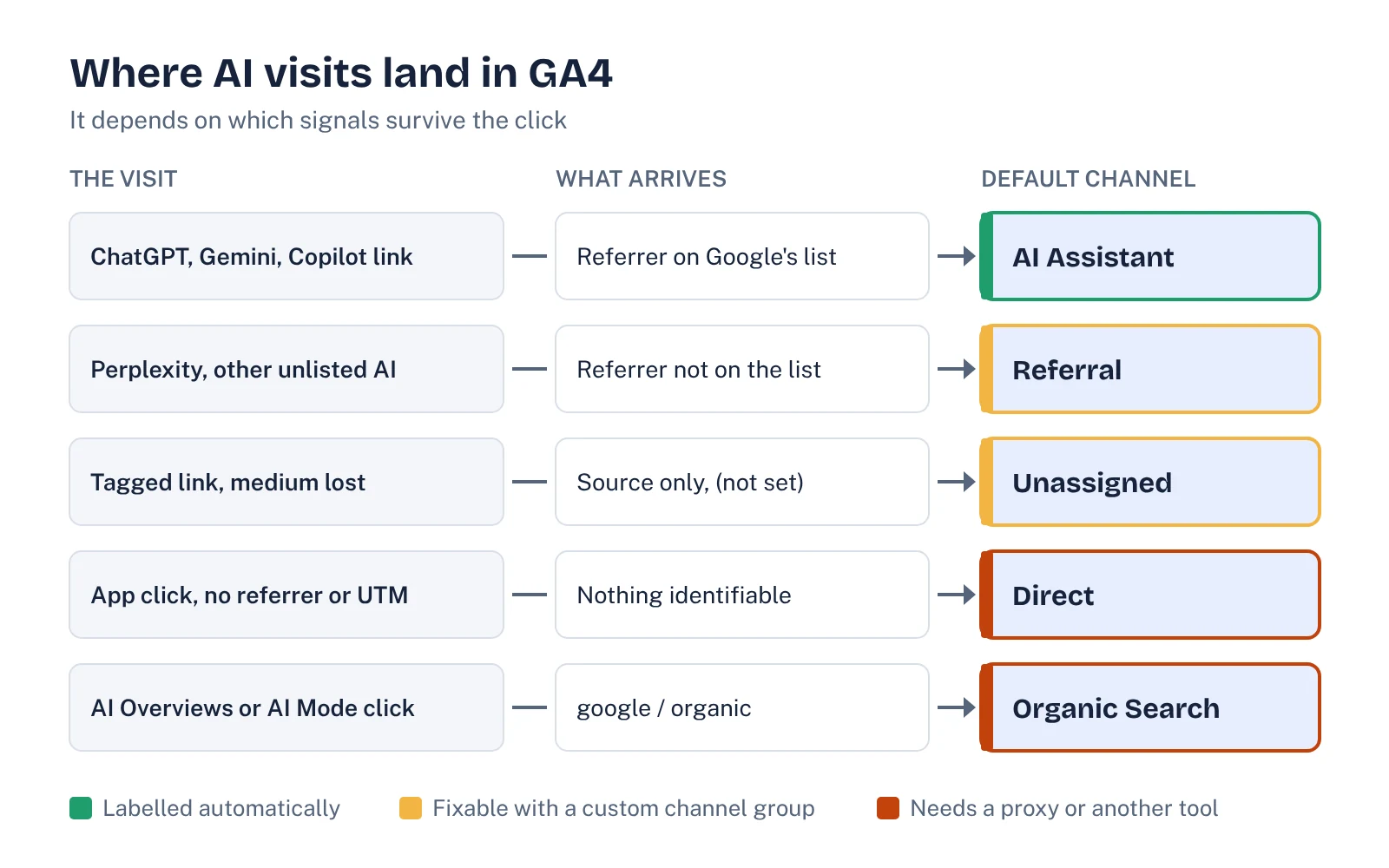
Here is the full picture in one table. Use it to decide which report answers which question.
| Visit type | What GA4 receives | Default channel | How to recover it |
|---|---|---|---|
| ChatGPT, Gemini, Copilot link with referrer | Referrer on Google's list | AI Assistant | Nothing to do |
| Perplexity or another unlisted assistant | Referrer not on the list | Referral | Custom channel group with a source regex |
| ChatGPT link with UTM but medium lost | Source only, medium (not set) | Unassigned | Custom channel group matching on source |
| App or in-app browser click, no tag | No referrer, no UTM | Direct | Can't be classified. Watch Direct on AI landing pages, ask on forms |
| AI Overviews or AI Mode click | google / organic | Organic Search | Not separable in GA4. Use Search Console trends on AI Overview queries |
The pattern is simple: a custom channel group can fix classification when GA4 has a source to work with. Nothing in GA4 can fix collection when the source never arrives. For that, you need proxies.
How to set up AI traffic tracking in GA4
This takes about 20 minutes and you need Editor access to the property.
- Look before you build. Open Reports, then Acquisition, then Traffic acquisition. Switch the dimension to session source/medium and search for "chatgpt", "perplexity", "gemini", "copilot" and "claude". Note every source/medium combination you see. This tells you which hostnames your property actually receives.
- Create a custom channel group. In Admin, go to Data display, then Channel groups, and create a new group. GA4 copies the default rules for you.
- Add a channel called "AI assistants". Set one condition: Session source matches regex, using the pattern below. Add the hostnames from step 1 if any are missing.
- Move it up. Drag the new channel above Referral, Organic Search and Unassigned. GA4 applies channel rules in order, so the AI rule must claim those sessions first.
- Save and use it. In Traffic acquisition, switch the primary dimension to your new channel group. Custom channel groups apply to past data too, which helps with the before-June comparison problem.
- Annotate October 9, 2026. Add an annotation in GA4 and in any dashboard. ChatGPT numbers before and after that date are not directly comparable.
Here is a starting regex for session source. It matches whole hostnames, with or without a subdomain, so it won't sweep in all Google traffic the way a bare "google" or "gpt" token would:
^(.*\.)?(chatgpt\.com|chat\.openai\.com|openai\.com|perplexity\.ai|gemini\.google\.com|copilot\.microsoft\.com|claude\.ai|deepseek\.com|grok\.com)$Treat it as a template, not a finished list. New assistants launch and hostnames change, so check your source report against it once a quarter. Blauer gives the same advice in his SEJ piece.
How to find the AI traffic GA4 can't label
Classification gets you the visible share. These three checks estimate the rest.
1. Watch Direct on the pages AI sends people to
List your top 10 landing pages for the AI assistants channel over the last 90 days. Then look at Direct sessions to those same pages by week. Most people don't type a deep URL like /integrations/salesforce or /compare/x-vs-y into a browser. A step change in Direct on those pages, starting the same week AI referrals fell, is a strong sign the visits moved channels rather than disappeared. This is the check LLM Pulse recommends for the October change.
2. Judge AI by outcomes, not by the referral line
Mark your demo request, trial signup and contact form as key events if you haven't already. Then compare total key events and pipeline over the period. If ChatGPT referrals halved but demo requests didn't move, the tracking changed, not the demand. Don't cut or redirect budget on the referral number alone.
3. Ask buyers directly
Add "ChatGPT or another AI assistant" to the "How did you hear about us?" field on your demo and signup forms. A buyer who reads an AI answer, then searches your brand name a day later, shows up as branded organic search. Only the form catches that. We cover this and other pipeline signals in our AI visibility tracking guide.
See your own AI visibility, free
Get a one-page audit of how ChatGPT, Perplexity and Gemini treat your brand against up to three competitors, plus your biggest gap. In your inbox within 48 hours.
Get my free auditWhat people are searching for (Ahrefs data)
We pulled US search demand for AI traffic tracking terms in Ahrefs Keywords Explorer on October 18, 2026. The numbers are small but the intent is very practical. People aren't asking what AI traffic is. They're asking how to see it.
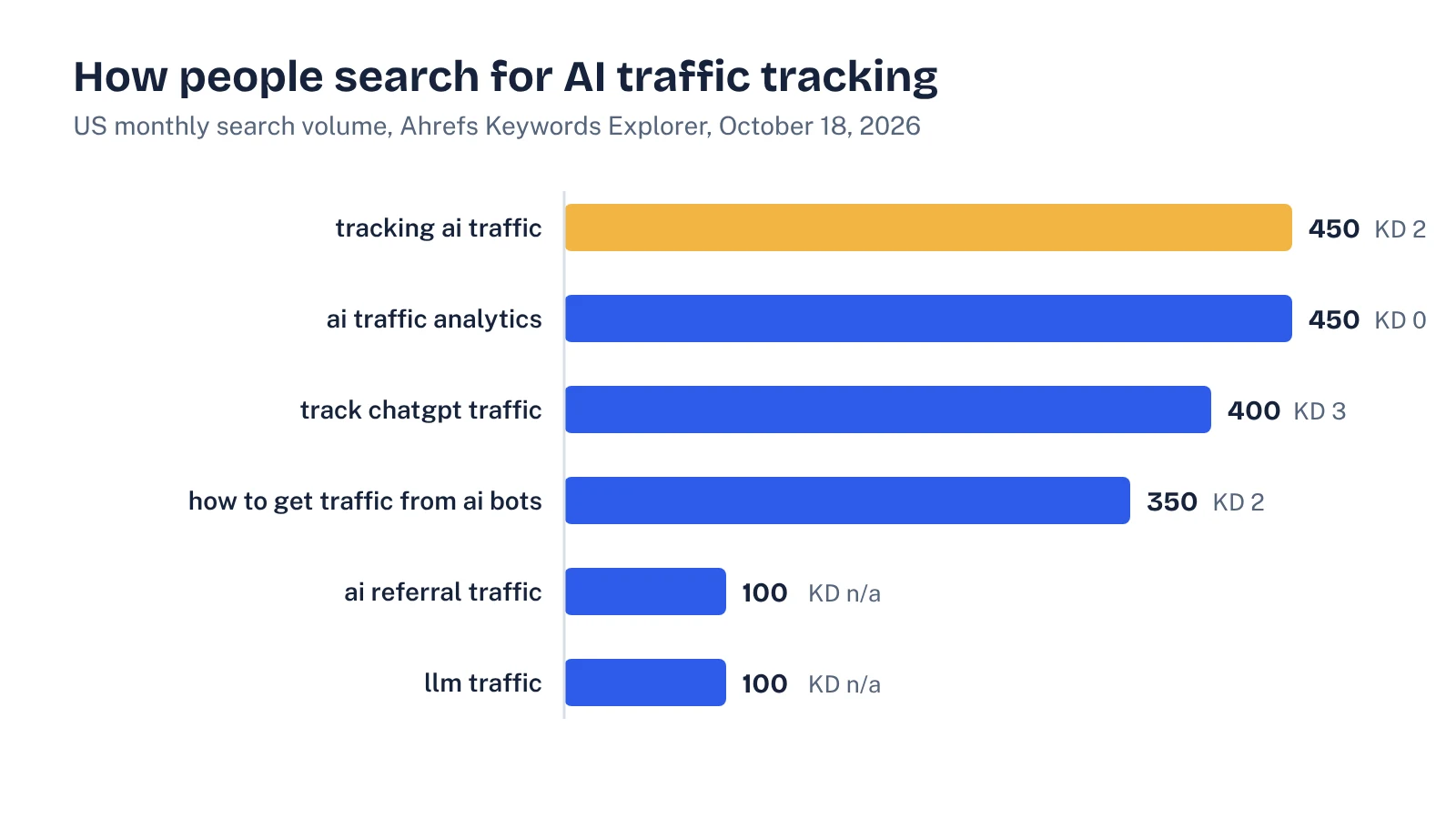
All of these terms had low keyword difficulty: 2 for "tracking ai traffic", 3 for "track chatgpt traffic" and 0 for "ai traffic analytics". In the US results for "tracking ai traffic", most of the top 10 were how-to guides from agencies, tool vendors and LinkedIn authors. The Ahrefs guide in the top three, for example, builds a regex-based channel but doesn't cover the native AI Assistant channel or how much AI traffic ends up in Direct.
What to put in a monthly AI traffic report
Traffic is the weakest of the AI signals, because it only counts the people who clicked and whose click kept its tags. A report built on it alone will swing with every product change at OpenAI or Google. Pair it with measures that don't depend on clicks:
- AI assistant sessions and key events, from your custom channel group, with the October 9 annotation visible.
- Direct sessions to AI landing pages, as the proxy for untagged visits.
- Self-reported AI attribution from forms, as a count and a share of demo requests.
- Visibility in the answers themselves: how often assistants mention you for your buying prompts, and against which competitors. Our guide to AI share of voice shows how to measure this with a fixed prompt set.
Also check the basics that decide whether ChatGPT can send you visitors at all. OpenAI's publisher FAQ says publishers who allow OAI-SearchBot can track referral traffic from ChatGPT, because ChatGPT adds utm_source=chatgpt.com to referral links. If your robots.txt blocks that bot, the problem isn't measurement. Our AI crawlers guide covers which bots to allow.
A 30-minute AI traffic audit
- Search source/medium for every AI hostname and write down where each one lands.
- Create or update the "AI assistants" custom channel group, placed above Referral and Unassigned.
- Add the October 9, 2026 annotation.
- Compare Direct sessions on your top AI landing pages for the four weeks before and after October 9.
- Confirm demo, trial and contact events are marked as key events.
- Add an AI option to "How did you hear about us?".
- Check robots.txt allows OAI-SearchBot, PerplexityBot and Claude-SearchBot.
- Set a quarterly reminder to review the regex against new sources.
None of this gives you a perfect number. Nobody has one right now. What it does give you is a number you can explain, a proxy for the part you can't see, and a report that won't send you into a panic the next time an assistant changes how its links work.
FAQ
Does Google Analytics track AI traffic?
Yes, partly. Since May 2026, GA4 puts visits from recognized AI assistants such as ChatGPT, Gemini and Copilot into an AI Assistant channel automatically. Visits from unlisted assistants, visits with no referrer, and clicks from Google's AI Overviews and AI Mode are not included.
Why did my ChatGPT traffic drop in October 2026?
LLM Pulse reported a drop of about 46% in ChatGPT referrals on the sites it monitors between October 9 and 11, 2026, while total traffic stayed roughly flat. Their explanation is that more ChatGPT links now arrive without a referrer or UTM tag and are counted as Direct. OpenAI had not commented, so check Direct traffic on your own ChatGPT landing pages before drawing conclusions.
How do I track Perplexity traffic in GA4?
Build a custom channel group with a rule on session source that matches perplexity.ai, and place it above Referral. Search Engine Journal found Perplexity was not on GA4's recognized AI assistant list in July 2026, so without a custom rule it is reported as Referral.
Can I see AI Overviews or AI Mode clicks in GA4?
Not separately. Google's channel definitions exclude AI Overviews and AI Mode from the AI Assistant channel, and those clicks arrive as google / organic. The practical workaround is to watch Search Console trends on queries where you know an AI Overview appears.
Sources
- Google Analytics Help: Default channel group and traffic-source dimensions
- Search Engine Journal: Google Analytics adds AI Assistant as a default channel group (May 14, 2026)
- Search Engine Journal: GA4's AI Assistant channel undercounts your AI traffic (July 15, 2026)
- LLM Pulse: ChatGPT referral traffic fell by almost half on October 9, 2026
- OpenAI Help Center: Publishers and developers FAQ
- Ahrefs: How to track and analyze your AI traffic
- Ahrefs Keywords Explorer, US data pulled October 18, 2026