AI prompt tracking: how to build a prompt set you can trust
AI prompt tracking means running a fixed set of buyer questions through ChatGPT, Perplexity and Google's AI features on a schedule, and logging whether your brand is mentioned or cited. The prompt set decides whether the numbers mean anything. This guide shows how to build one, how many runs you need, and how to keep it stable.
- Prompt tracking measures a sample of AI answers, not a ranking. Treat every number as an estimate with a margin of error.
- Build prompts from buyer language (sales calls, support tickets, People Also Ask), not from your keyword list or product copy.
- SparkToro found two AI answers to the same prompt repeat the same brand list less than 1 time in 100, so run each prompt several times.
- With 100 answers, a 30% mention rate is only accurate to about ±9 points. Report big segments, not tiny ones.
- Version the prompt set, freeze it for a quarter, and log every change so trends stay comparable.
What AI prompt tracking is, and what it is not
AI prompt tracking is the measurement side of AI visibility. You pick a set of questions your buyers ask, run them through the assistants that matter to you, and record what comes back: whether your brand is named, which pages are cited, which competitors appear, and how each one is described.
What it is not: a rank tracker. Classic SEO tools check one results page for one keyword and report a position. AI answers don't work that way. They are generated fresh each time, they change with wording, and the same prompt can return a different shortlist a minute later. So prompt tracking is closer to running a survey than reading a leaderboard. You are sampling answers and estimating how often something happens.
That shift changes what matters. The tool you pick matters less than two decisions you make before you run anything: which prompts go in the set, and how many answers you collect per prompt. Get those right and almost any method works, including a spreadsheet. Get them wrong and the dashboard looks precise while measuring noise.
If you are new to the wider process (engines, metrics, reporting), start with our guide to setting up AI visibility tracking. This post goes one level deeper, into the prompt set itself.
Why prompt sets are suddenly a search topic
Marketers are asking about this directly. We pulled the main phrasings from Ahrefs Keywords Explorer this morning (US data, October 25, 2026). The numbers are small individually but spread across many variants, a pattern you usually see when a practice is new and people don't yet share a name for it.
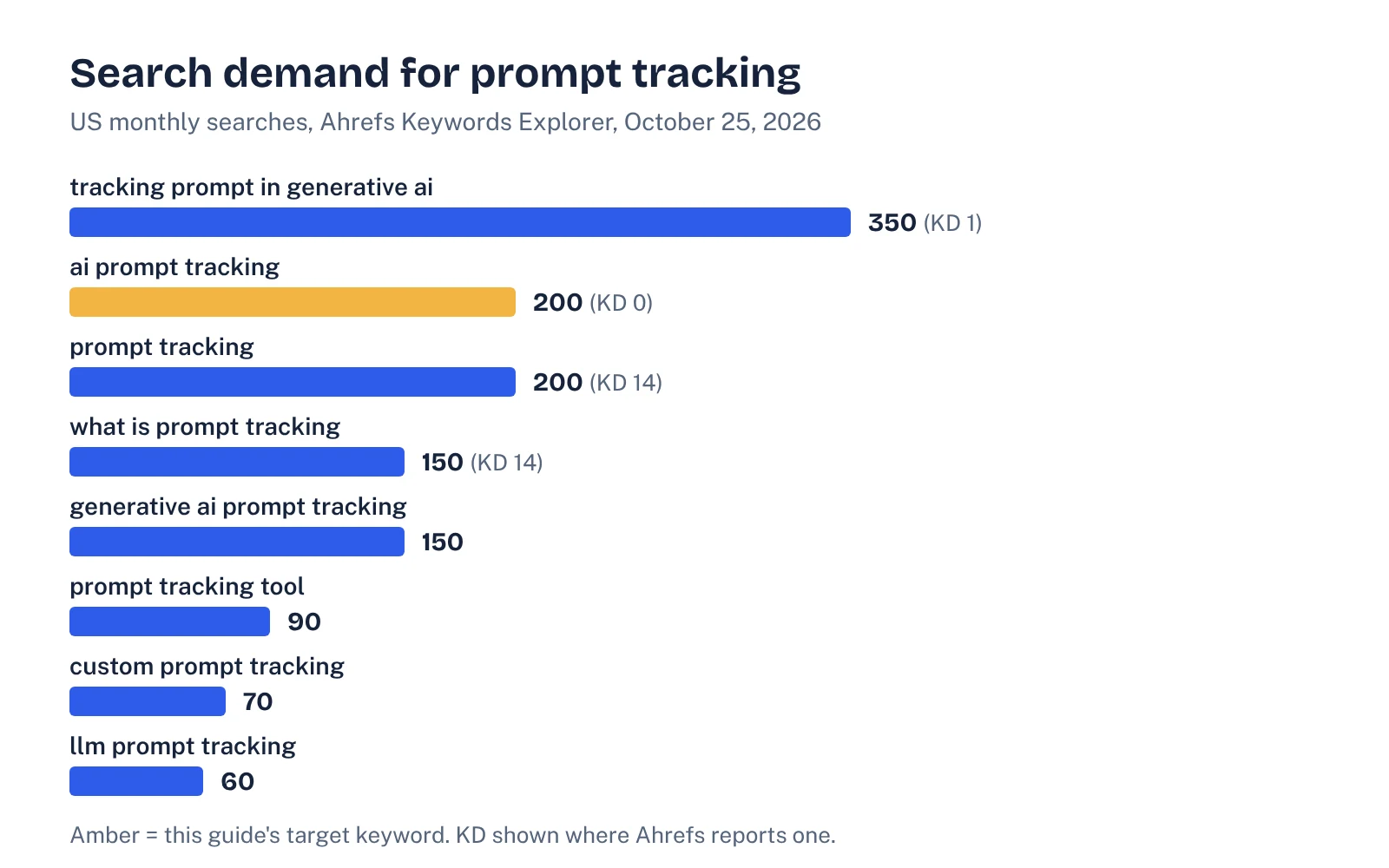
Two other signals stand out in the same data. Several vendor-branded queries ("peec ai aeo prompt tracking", "scrunch aeo tool prompt tracking", "hubspot aeo prompt tracking multilingual support") each get 60 to 150 searches a month, so people are comparing tools on this feature. And "how often should I run AEO prompt tracking?" shows up as its own question. We answer it below.
Why one run of a prompt tells you almost nothing
The best public evidence on answer variability comes from SparkToro and Gumshoe.ai. In their January 2026 study, 600 volunteers ran 12 prompts through ChatGPT, Claude and Google's AI a combined 2,961 times. Their findings:
- ChatGPT and Google's AI had less than a 1 in 100 chance of returning the same brand list twice. Getting the same list in the same order was closer to 1 in 1,000.
- When 142 people wrote their own prompt for the same need, the prompts were almost all different (average semantic similarity 0.081).
- Even so, strong brands kept showing up. One hospital appeared in 69 of 71 ChatGPT answers but was the first name mentioned in only 25 of them.
The authors' conclusion, also covered by Search Engine Land: how often you appear is a usable metric, while "your position in ChatGPT" is not.
Google adds its own source of variation. Its AI features documentation says AI Overviews and AI Mode may use a "query fan-out" technique, issuing multiple related searches across subtopics, and that the two features may use different models, so the responses and links they show will vary. In practice, the same prompt can pull different supporting pages depending on which sub-searches run.
Put together, this means a prompt set has to be designed for coverage (many real phrasings of each buying need) and repetition (several runs of each prompt). Most guides cover the first and skip the second.
How to build a prompt set, step by step
Here is the process we use. It takes a focused afternoon for a single product line.
- List the buying jobs, not the keywords. Write down the five to eight situations in which someone ends up needing your category: "we outgrew spreadsheets for X", "our current tool doesn't integrate with Y", "we need SOC 2 before a deal closes". Each job becomes a group of prompts.
- Collect real wording. Pull phrases from sales call notes, demo questions, support tickets, review sites, Reddit threads and People Also Ask boxes. AirOps recommends combining panel data, People Also Ask patterns, search intent data and first-party customer conversations; the last of those is the one most teams skip and the one closest to pipeline.
- Write prompts the way buyers type them. Full sentences, constraints included: team size, budget, stack, region. "Best project management software" is a keyword. "We're a 40-person agency on Google Workspace, what project tool should we switch to from Trello?" is a prompt.
- Tag each prompt. Give every prompt an intent bucket, a persona, a funnel stage and the product line it represents. Tags are what let you report "comparison prompts for IT buyers" later.
- Cluster and de-duplicate. Group near-identical prompts and keep one canonical version per cluster, plus one or two deliberate variants in different wording. Variants are how you capture the phrasing spread SparkToro found.
- Separate branded prompts. Prompts that contain your name ("is [you] good for agencies?") almost always mention you. Keep them in their own small set and never blend them into the headline rate.
- Set the run plan. Decide engines, runs per prompt and whether web search is on or off (see the next two sections), then freeze the set as version 1.0.
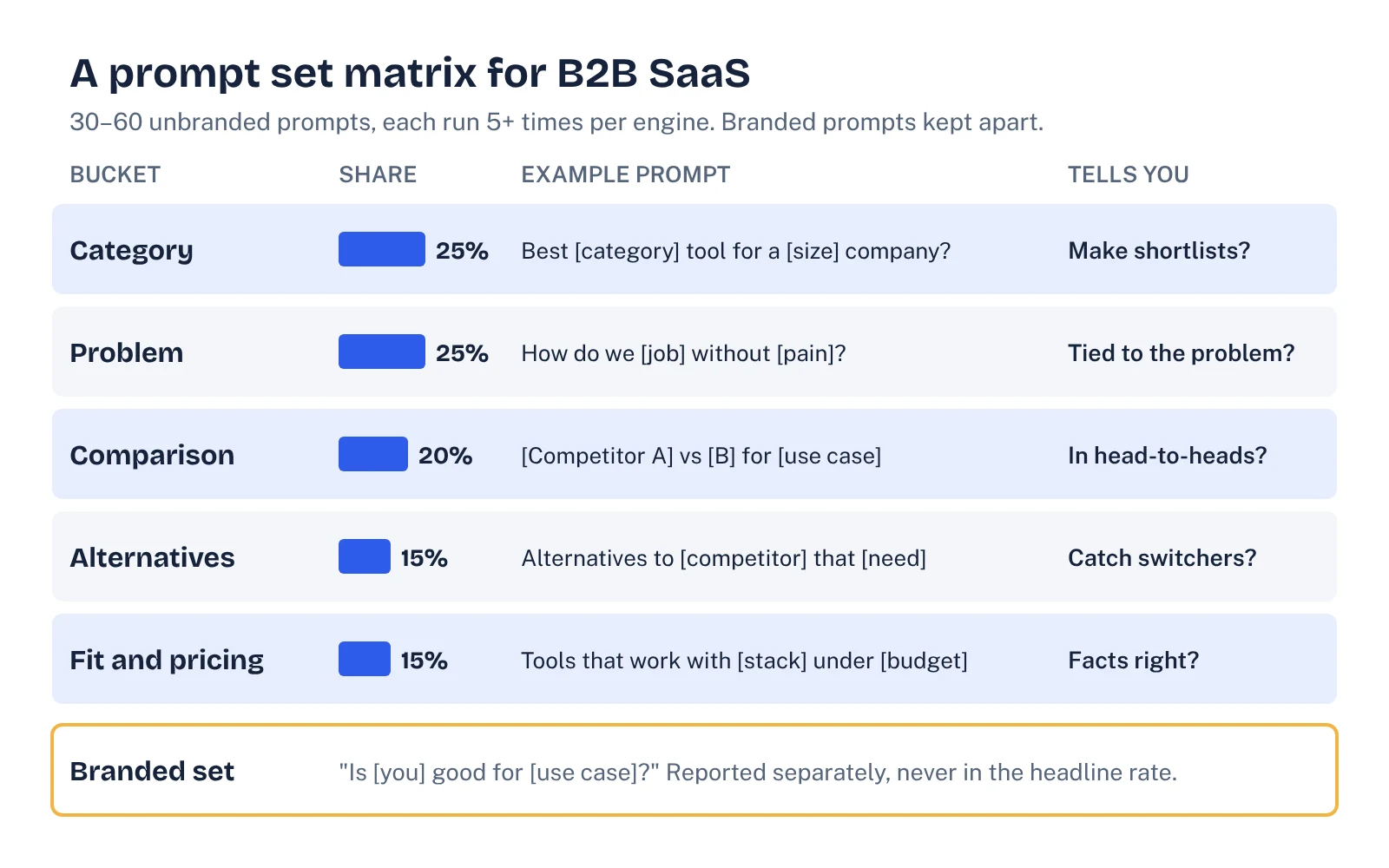
The five intent buckets
| Bucket | Example prompt pattern | What it tells you | Suggested share |
|---|---|---|---|
| Category | "What's the best [category] tool for a [size/type] company?" | Whether you make shortlists at all | 25% |
| Problem | "How do we [job] without [pain]?" | Whether you are linked to the problem before the buyer knows the category | 25% |
| Comparison | "[Competitor A] vs [Competitor B] for [use case]" | Whether you are pulled into head-to-heads you aren't named in | 20% |
| Alternatives | "Alternatives to [competitor] that [constraint]" | Whether you catch switchers | 15% |
| Fit and pricing | "Which [category] tools work with [stack] under [budget]?" | Whether the facts about you (price, integrations, compliance) are right | 15% |
Shares are a starting point. If most of your deals start as rip-and-replace, weight alternatives more heavily. If you sell into a category buyers don't know exists yet, weight problem prompts.
How many prompts, and how many runs per prompt
This is where most prompt sets fail quietly. Teams add more prompts because coverage feels like rigor, then run each one once. The result is a large number of single, noisy observations.
A mention rate is a proportion, so you can estimate its uncertainty with the standard formula for a sample proportion. The table below shows the approximate 95% margin of error for an observed 30% mention rate at different numbers of answers. We calculated these ourselves; they are simple statistics, not results from a study.
| Answers in the segment | Margin of error (95%) | A 30% rate really means |
|---|---|---|
| 20 | ±20 points | 10% to 50% |
| 50 | ±13 points | 17% to 43% |
| 100 | ±9 points | 21% to 39% |
| 200 | ±6 points | 24% to 36% |
| 400 | ±4.5 points | 25.5% to 34.5% |
| 1,000 | ±3 points | 27% to 33% |
Treat these as best-case numbers. Answers to the same prompt are more alike than answers to different prompts, so the real uncertainty is somewhat larger than the formula suggests. That is one more reason to use several phrasings per buying job.
Now do the math on a typical setup. Forty unbranded prompts, three engines, five runs each gives 600 answers a month, or 200 per engine. That supports an engine-level number with a margin of roughly ±6 points. But split it further, say one bucket of eight prompts on one engine, and you are down to 40 answers and a margin of about ±14 points. A month-to-month swing of 10 points in that segment means nothing.
On runs per prompt, the sources differ. Waikay suggests at least five to ten runs per model for each core prompt. SparkToro's authors suggest asking 60 to 100 times and averaging if you want a stable read on a single prompt. A workable middle ground for most teams: five runs per prompt per engine for the routine tracking, and 30 or more runs for the handful of prompts you are actively trying to win.
How often to run it, and which settings to fix
Monthly is the right default cadence for the full set. It gives content and PR work time to land, and it matches how most teams report. Weekly runs make sense only for a small test set tied to a specific change, such as a new comparison page or a fixed pricing table.
More important than frequency is keeping the conditions the same every time:
- Web search on or off. Grounded answers reflect what is on the web now; model-only answers reflect training data. Waikay recommends logging which channel each run used and never mixing them unlabeled. We agree: they respond to different work.
- Engine and mode. Record the product and mode (ChatGPT with search, Perplexity, Google AI Mode, AI Overviews). Google itself says AI Overviews and AI Mode can show different responses and links.
- Clean sessions. Use logged-out or fresh sessions where you can, so memory and past chats don't color answers.
- Location and language. Fix the country. If you sell in several markets, treat each as its own prompt set rather than a translation of one.
If you use a tool, check that it lets you control and export these settings. Our comparison of AI visibility tools covers which ones report run counts.
See your own AI visibility, free
Get a one-page audit of how ChatGPT, Perplexity and Gemini treat your brand against up to three competitors, plus your biggest gap. In your inbox within 48 hours.
Get my free auditKeep the set stable: version it like code
A prompt set that changes every month can't show a trend. If the mention rate rises, you won't know whether your work moved it or the new prompts did. Treat the set as a versioned asset:
- Freeze for a quarter. Version 1.0 runs unchanged for at least three months.
- Keep a change log. Every added, removed or reworded prompt gets a date and a reason.
- Add new prompts in a probation set. Run them alongside the core set for a cycle before promoting them, so you can report them separately.
- Retire with a rule. Drop prompts only when the buying job no longer exists (a discontinued product, a market you left), not because the numbers look bad.
- Re-baseline openly. When you ship version 2.0, run both versions once in the same month so the report can bridge the two.
This sounds like overhead, but it is a 15-minute review each quarter. It is also what makes your numbers defensible when a CFO asks why visibility "dropped" in a month you changed the prompts.
What to log and report from each run
For every answer, capture the prompt ID and version, engine and mode, search setting, date, whether your brand was mentioned, whether one of your URLs was cited, which competitors appeared, and any factual errors about you. That last column is often the most useful: wrong pricing or a missing integration is a fixable problem with a clear owner.
From that log, report a small set of numbers per segment: mention rate, citation rate and share of voice against named competitors, each with the answer count beside it. Our guide to calculating AI share of voice shows why the answer count belongs next to every figure, and which of the three common share-of-voice formulas to use.
Finally, connect the prompts to action. For each bucket where you are missing, look at which pages get cited instead. Those are the pages to beat, update or get included on. Prompt tracking is only worth the time if each cycle ends with a short list of fixes.
FAQ
What is prompt tracking?
Prompt tracking is the practice of running a fixed list of questions through AI assistants on a schedule and recording what comes back: which brands are mentioned, which pages are cited, and how you are described. It is the measurement layer behind AI visibility and generative engine optimization work.
How many prompts should I track?
For most B2B SaaS teams, 30 to 60 unbranded prompts across four or five intent buckets is a good start, plus a small separate set of branded prompts. More prompts help only if you can afford enough runs per prompt; a small set run many times beats a huge set run once.
How often should I run AEO prompt tracking?
Run the full set at least monthly, and run each prompt several times per engine in each cycle because answers vary from run to run. Weekly runs are useful when you are testing a specific change, but look at monthly averages before you report a trend.
Should I track prompts with web search on or off?
Track them separately. Answers grounded in live search reflect what is on the web today, while answers from the model alone reflect training data. Mixing the two in one number hides which lever you need to pull.
Can I do prompt tracking without a tool?
Yes. A spreadsheet with your prompt set, a run log and a few columns for mentions and citations works for a few hundred answers a month. Tools save time once you need thousands of answers, multiple engines or several markets.
Sources
- SparkToro: AIs are highly inconsistent when recommending brands or products (January 2026)
- Search Engine Land: AI recommendation lists repeat less than 1% of the time
- Google Search Central: AI features and your website
- AirOps: Prompt Discovery (April 2026)
- Waikay: AI prompt tracking
- Ahrefs Keywords Explorer (US data pulled 25 October 2026)