AI brand monitoring: what to watch weekly, monthly and quarterly
AI brand monitoring means checking, on a fixed schedule, how ChatGPT, Google's AI Overviews and AI Mode, and Perplexity describe and recommend your brand. Because answers change on almost every run, watch yes/no events weekly and review mention rates monthly. Below: the cadence, the sample sizes behind it, alert rules and a fix process.
- Monitor what AI assistants say about you, not only what people say on social. They are different jobs.
- With 40 prompts run three times, a week-over-week change under about 12 points is likely noise.
- Watch events weekly: wrong facts, blocked crawlers, new negative sources. Review rates monthly.
- Set alert thresholds and one owner before you look at the data.
- Fix wrong answers through the pages AI cites: your own first, then third-party profiles.
What AI brand monitoring means (and what it doesn't)
Search "AI brand monitoring" and you get two different products. One is social listening with AI on top: a tool reads news, reviews and social posts and summarizes what people say about you. The other is monitoring what AI assistants themselves say when a buyer asks them about your category. Both are useful. This guide is about the second one.
For a B2B SaaS company, the second kind matters more each quarter. A buyer asks ChatGPT for "the best SOC 2 automation tool for a 50-person startup" or asks Google's AI Mode to compare two vendors. The answer names three to six brands, describes each in a sentence, and cites a handful of pages. If you aren't named, or you're described wrongly, you lose that buyer before your site gets a visit.
Monitoring is the ongoing part of this. Setting up a prompt set and a baseline is covered in our guide to AI visibility tracking. Monitoring is what you do every week and month after that: deciding what to look at, how often, and which changes deserve a response.
Why AI answers are hard to monitor
Classic rank tracking works because Google's organic results are fairly stable from one day to the next. AI answers are not. Three findings set the ground rules.
- Answers change on almost every run. In SparkToro's study of 2,961 responses, ChatGPT and Google's AI had less than a 1 in 100 chance of giving the same list of brands twice, and about 1 in 1,000 of giving the same list in the same order. The author concluded that visibility percentage across many runs is a reasonable metric, but "rank in AI" is not.
- Engines move in different directions. Semrush's AI Visibility Index found ChatGPT and Google AI Mode agree on 67% of mentioned brands but only 30% of sources. Over the same three months, ChatGPT began using 80% more sources while Reddit's share in AI Mode rose 75%.
- Google doesn't separate AI traffic for you. Google says AI feature traffic is reported in the Performance report under the "Web" search type, alongside regular results.
Put together, this means a single check tells you very little, each engine needs its own line in your report, and your analytics won't flag a change on their own. Monitoring has to be designed around those limits.
How big a change has to be before it's real
This is the question most monitoring guides skip. If your mention rate in ChatGPT was 34% last week and 27% this week, did something happen?
Usually not. A mention rate is a proportion, and proportions from small samples swing a lot. Using the standard formula for comparing two proportions, we calculated how large a change between two periods has to be before it is unlikely (at 95% confidence) to be random noise. The table assumes a mention rate around 30%, which is typical for a mid-size B2B brand in a crowded category.
| Answers per engine, per period | Example setup | Change needed to be meaningful |
|---|---|---|
| 30 | 30 prompts, 1 run each | about ±23 points |
| 60 | 20 prompts, 3 runs | about ±16 points |
| 120 | 40 prompts, 3 runs | about ±12 points |
| 240 | 60 prompts, 4 runs | about ±8 points |
| 480 | 4 weekly runs of 120, pooled monthly | about ±6 points |
The figures come from 1.96 × √(2p(1−p)/n). They are a rule of thumb, not a guarantee: answers to related prompts aren't fully independent, so real noise is a little higher. At a 10% mention rate the bands are narrower (about ±11 points at 60 answers), and at 50% they are a little wider.
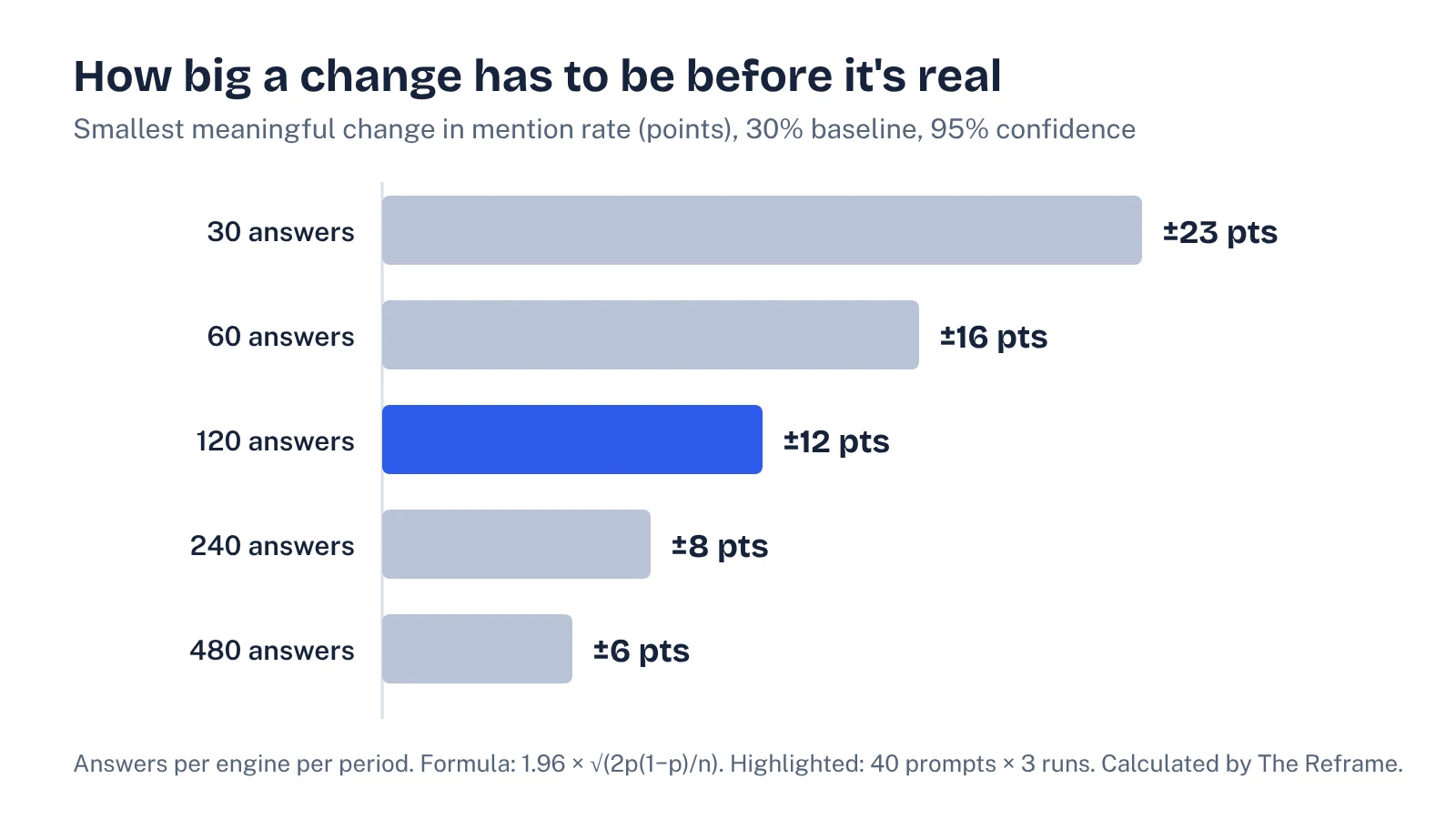
The practical conclusion: with a typical 40-prompt set run three times, a week-over-week drop of 7 points is noise. Pool four weekly runs into a month and you can start to trust moves of 6 points or more. This is why we split monitoring into events you watch weekly and rates you review monthly.
What to watch weekly, monthly and quarterly
Meltwater's guide suggests a similar rhythm of weekly check-ins, monthly deep dives and quarterly leadership reviews. The sample-size math above tells you what belongs in each. Weekly monitoring should look for events: things that are either true or false and don't need a large sample to detect. Monthly reviews are for rates. Quarterly reviews are for decisions.
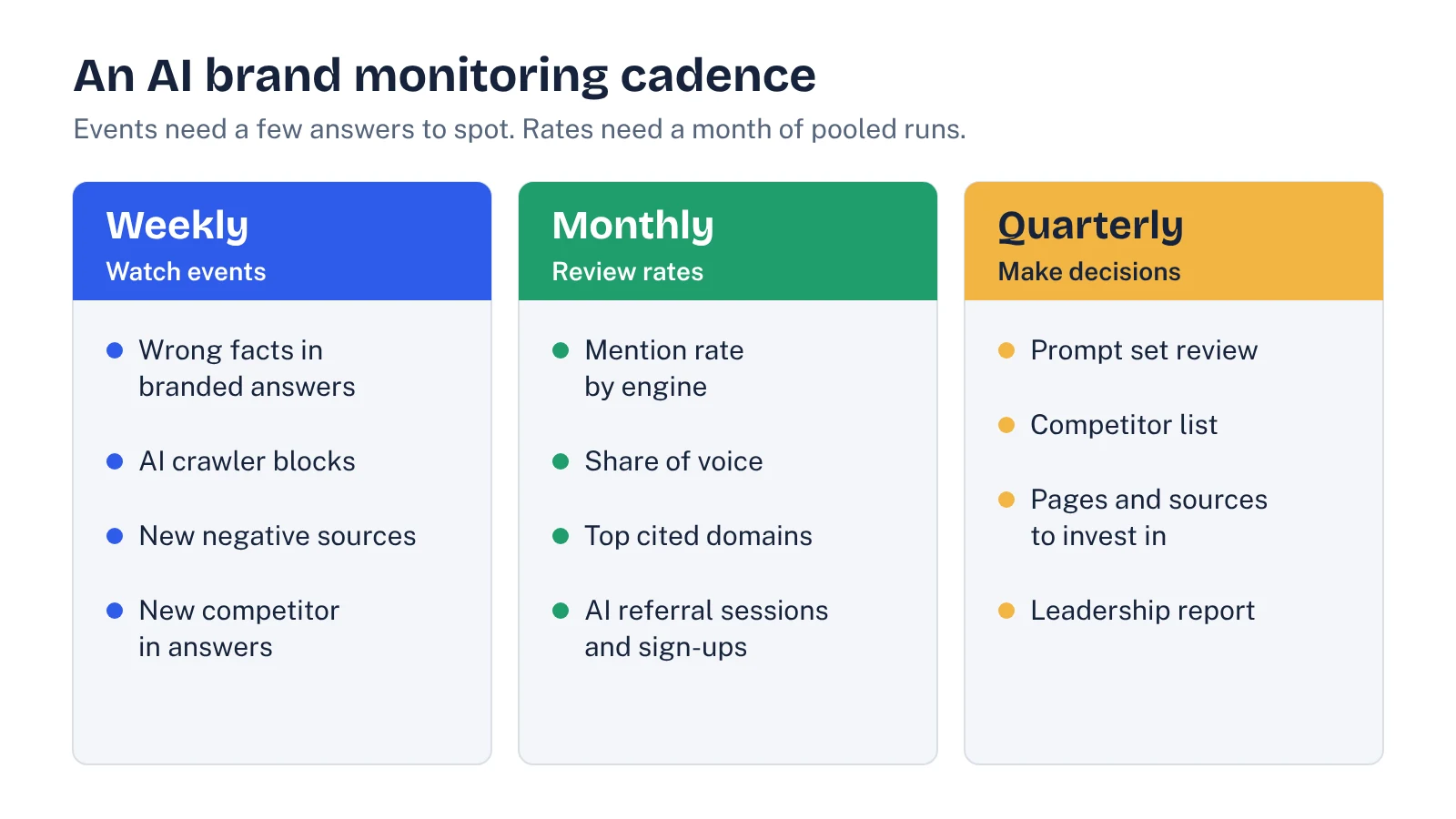
| Cadence | What you check | Why this cadence |
|---|---|---|
| Weekly | Wrong facts in branded answers (pricing, category, integrations, a retired product); AI crawler access in your logs and firewall; new pages cited for your brand or category; a competitor appearing where it never did | Each one is a yes/no event you can spot in a few answers, and some (a blocked crawler, a wrong price) do damage every day they stay unfixed |
| Monthly | Mention rate and recommendation rate by engine; share of voice against 3 to 5 competitors; top cited domains; AI referral sessions and sign-ups | Pooling a month of runs gives a sample large enough to trust moves of about 6 points |
| Quarterly | Prompt set review; competitor list; which pages and third-party sources to invest in; what to report to leadership | Changing prompts more often breaks your trend line |
For the monthly metrics, use the definitions in our guide to calculating AI share of voice, and keep them fixed. For referral traffic, the GA4 setup for AI traffic shows how to catch the visits the default channel misses.
How to set up AI brand monitoring in 7 steps
- Write down what you are protecting. List the facts that must be right in any answer: category, primary buyer, pricing model, top integrations, compliance claims, and anything you have retired. This becomes your accuracy checklist.
- Split your prompts into two groups. Branded prompts ("What is [brand]?", "[brand] pricing", "[brand] vs [competitor]") are for accuracy. Unbranded prompts ("best [category] for [use case]") are for visibility. Most teams need 10 to 15 branded and 30 to 50 unbranded.
- Pick engines by where your buyers ask. For most B2B SaaS that means ChatGPT, Google AI Overviews and AI Mode, and Perplexity. Report each one separately, since they cite different sources.
- Set a fixed run schedule. Run the full set weekly, at least three times per prompt per engine, in clean sessions or through a tool's API. Same day, same settings.
- Log every answer as a row. Prompt, engine, date, run number, brands named, whether you were recommended, how you were described, and the cited URLs. A spreadsheet is enough to start; our comparison of AI visibility tools covers when software is worth paying for.
- Define alert rules before you look at data. See the next section. Deciding thresholds after you see a drop leads to overreaction.
- Give it one owner. One person reviews the weekly events, routes fixes (content, product marketing, PR, web ops) and writes the monthly summary.
Alert rules that are worth acting on
Good alert rules are specific, tied to an owner, and set wide enough to ignore noise. These are the ones we use as a starting point.
| Trigger | Threshold | First response |
|---|---|---|
| Wrong fact in a branded answer | Same error in 2 or more answers in one week | Find the cited page that carries it; fix your own page or ask the third party to update |
| AI crawler blocked | Any 403 or block for OAI-SearchBot, PerplexityBot or Googlebot on key pages | Web ops fixes the firewall or robots.txt rule the same week |
| New negative or outdated source cited | Appears in 2 or more answers | Decide: update, respond, or publish a clearer page on the topic |
| Mention rate drop | Larger than the noise band for your sample, two months running | Check which prompts and engines moved and which sources changed |
| Competitor gain | Share of voice up beyond the noise band | Read the pages now cited for them; look for a new review, listicle or comparison page |
Crawler access is the cheapest alert to automate and the most costly to miss. Our guide to AI crawlers lists the user agents and the firewall settings that block them by accident.
See your own AI visibility, free
Get a one-page audit of how ChatGPT, Perplexity and Gemini treat your brand against up to three competitors, plus your biggest gap. In your inbox within 48 hours.
Get my free auditWhen AI gets your brand wrong
Being described wrongly can cost as much as being missing. A buyer told your product "doesn't integrate with Salesforce" or "starts at $500 a month" when it doesn't will rarely check.
There is no form to submit corrections to ChatGPT or Google's AI answers, so the fix runs through the sources they read. The process that works:
- Collect the wrong answers and the URLs they cite. If the answer cites nothing, run the prompt in an engine that shows sources, such as Perplexity or AI Mode, to see what it is drawing on.
- Check your own pages first. Outdated pricing pages, old docs and archived blog posts are the most common cause.
- Fix third-party pages you control or can influence: review profiles, partner directories, marketplace listings.
- Publish the correct fact plainly on a page that can rank for the question, such as a pricing page with numbers or an integrations page that lists each one.
- Re-check in the next weekly run, and expect it to take weeks, not days, to clear across engines.
Google is clear that there are no special files or markup needed to appear in its AI features. Clear, indexable pages and consistent third-party information do the work.
Reporting monitoring results
A monthly one-page summary is enough for most teams. Keep the same layout every month so trends are obvious:
- Mention rate and share of voice by engine, with the sample size and last month's figure.
- Whether any change is outside the noise band. Say so plainly when it isn't.
- Events found and fixed this month, with dates.
- Top 10 cited domains for your category and any new entries.
- AI referral sessions and sign-ups.
- Next month's actions, each with an owner.
If you are starting from zero and want to know what to fix first, run a one-off AI visibility audit before you set up ongoing monitoring. The audit finds the causes; monitoring tells you whether the fixes held.
How much people search for this
Interest is real but early. In Ahrefs Keywords Explorer on October 23, 2026, "ai brand monitoring" showed about 1,000 US searches a month (keyword difficulty 21), "ai search monitoring" 350 (KD 0) and "chatgpt brand monitoring" 350 (KD 0). The top results still mix social listening platforms with AI answer trackers, which tells you the category hasn't settled. If you sell to marketing teams, expect buyers to use both meanings.
FAQ
What is AI brand monitoring?
It is the ongoing check of how AI assistants such as ChatGPT, Google AI Overviews and AI Mode, and Perplexity mention, describe and recommend your brand. The term is also used for AI-powered social listening, which tracks what people say about you online. For B2B SaaS visibility, you usually need the first kind.
How often should I monitor my brand in ChatGPT?
Run your prompt set weekly, but use the weekly run to catch events such as wrong facts or a blocked crawler. Review mention rate and share of voice monthly, when you have pooled enough answers to separate real changes from noise.
How many prompts do I need for AI brand monitoring?
Most B2B SaaS teams do well with 10 to 15 branded prompts for accuracy and 30 to 50 unbranded category prompts for visibility. Run each at least three times per engine, because answers vary between runs.
Can I correct what ChatGPT says about my company?
There is no direct correction form. Find the pages the answer draws on, fix your own outdated pages first, then update third-party profiles and listings. Publish the correct fact clearly on an indexable page and recheck over the following weeks.
Is AI brand monitoring the same as social listening?
No. Social listening tracks posts, reviews and news written by people. AI brand monitoring tracks the answers AI assistants generate. They connect, because assistants often cite reviews and community threads, so findings from one should feed the other.
Sources
- SparkToro: AIs are highly inconsistent when recommending brands or products
- Semrush: 3 months of AI Visibility Index data, what we've learned about AI search
- Google Search Central: AI features and your website
- Meltwater: How to build an AI brand monitoring strategy
- Ahrefs Keywords Explorer (US data pulled October 23, 2026)