Generative engine optimization tools: the five types, what each does, and what to buy first
Generative engine optimization tools fall into five jobs: tracking how AI assistants mention you, checking AI crawlers can reach your pages, improving content, earning third-party mentions, and measuring AI referral traffic. Most teams should start with the free reports from Google and Bing and buy a tracker second. This guide maps each type, what it costs you in effort, and the order to buy in.
- "GEO tool" covers five different jobs. Most published lists only compare trackers, which is one of the five.
- Google's own guide (updated July 2026) says you don't need special AI files or markup for Google Search, and warns against tools that promise ranking success.
- Free first: Search Console's generative AI report, Bing Webmaster Tools' AI Performance report, your analytics referrals and your server logs.
- Buy a tracker when you need a repeatable monthly number across ChatGPT, Gemini and Perplexity, and ask how it samples before you pay.
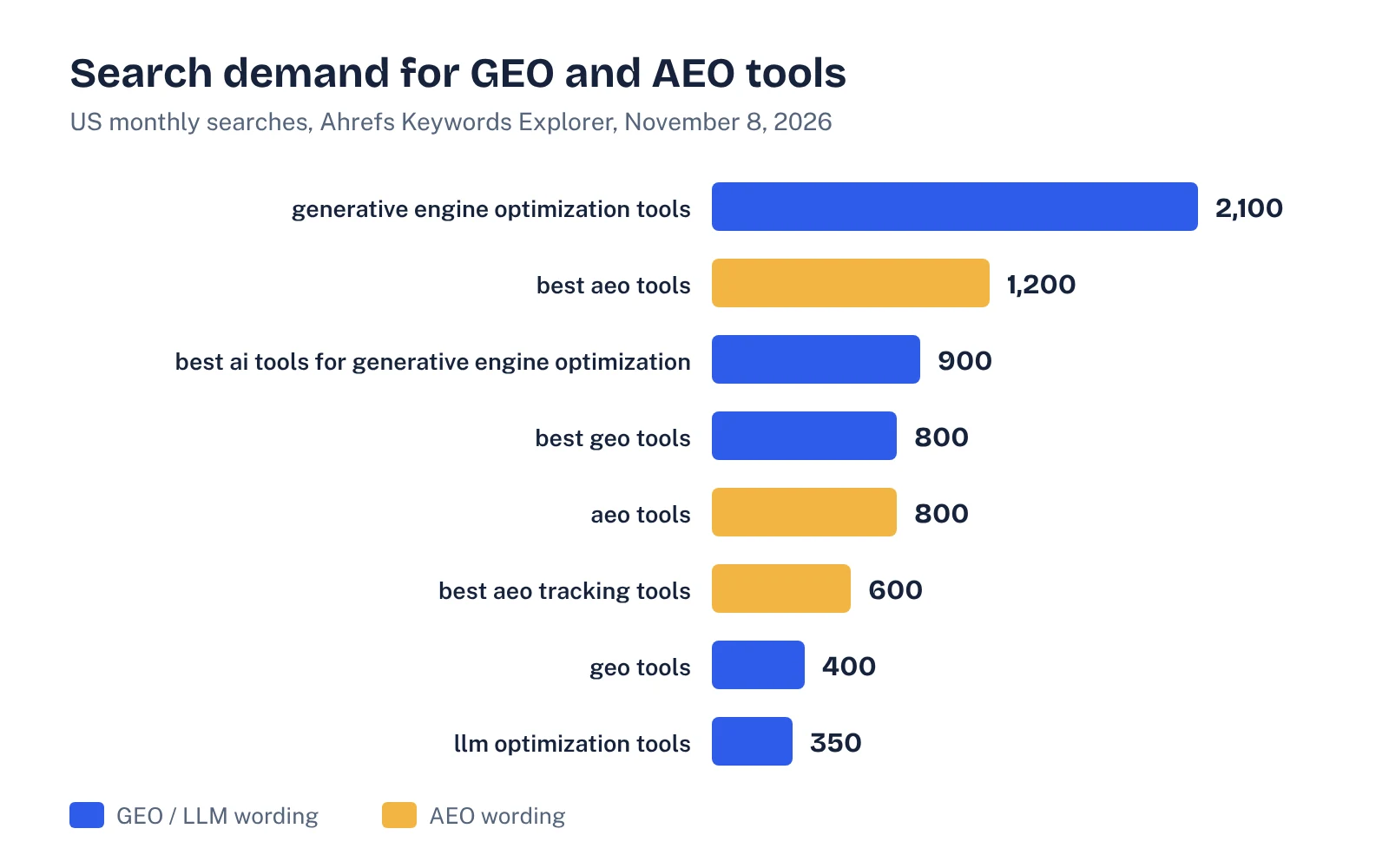
- Search demand for these tools is real: Ahrefs shows 2,100 US searches a month for "generative engine optimization tools" and 1,200 for "best aeo tools" (November 8, 2026).
What generative engine optimization tools actually do
Generative engine optimization (GEO) is the work of getting your brand named and your pages cited in AI-generated answers. The term comes from a 2023 research paper by Aggarwal and colleagues, later accepted to KDD 2024, which reported that content changes could boost visibility "by up to 40%" in generative engine responses. Since then, a whole software category has grown around the idea.
The problem is that "GEO tool" now means very different things. Some tools count how often ChatGPT mentions you. Some check whether AI crawlers can read your site. Some rewrite your content. If you compare them as if they were the same product, you'll overpay for one job and miss another.
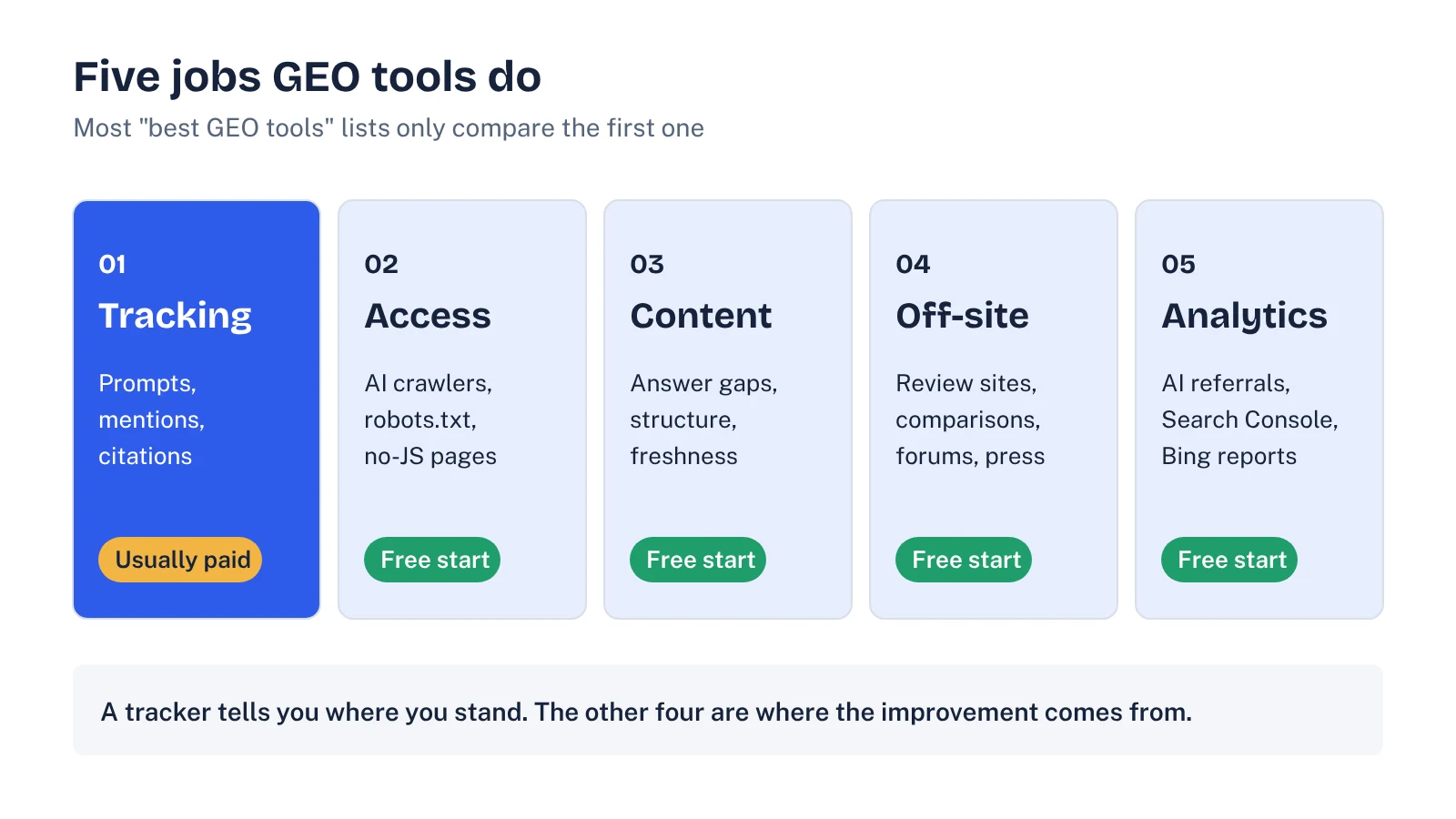
So we sorted the category by job. There are five:
- Tracking. Run buyer prompts through AI assistants and record mentions, citations and competitors.
- Access. Check that AI crawlers can fetch and read your pages.
- Content. Find gaps in your pages and improve how clearly they answer buyer questions.
- Off-site. Find and earn mentions on the third-party pages assistants cite: reviews, comparisons, forums, press.
- Analytics. Measure the traffic and conversions that AI answers send you.
What buyers are searching for
We pulled the main tool queries from Ahrefs Keywords Explorer this morning (US, November 8, 2026). Demand is split across "GEO" and "AEO" wording, and the AEO variants are mostly easier to rank for.
| Query | US monthly searches | Keyword difficulty |
|---|---|---|
| generative engine optimization tools | 2,100 | 26 |
| best aeo tools | 1,200 | 6 |
| best ai tools for generative engine optimization | 900 | 28 |
| best geo tools | 800 | 13 |
| aeo tools | 800 | 8 |
| best aeo tracking tools | 600 | 18 |
| geo tools | 400 | 38 |
| llm optimization tools | 350 | 20 |
Two things stood out in the search results. Google shows an AI Overview for the main query. And the top organic results are almost all "best tools" listicles, several written by vendors that rank their own product. The SE Ranking review covers 11 platforms, and the Geotoolbox guide splits tools into suites, free graders, content optimizers and trackers. Both are useful. Neither tells a B2B SaaS team what to buy first, or what Google itself says about these tools.
What Google says you don't need
Before you buy anything, read Google's guide to optimizing for generative AI features, last updated July 10, 2026. It ranked sixth for "generative engine optimization tools" when we checked. Three points matter for tool buying:
- It's still SEO. Google says SEO best practices "continue to be relevant" for AI Overviews and AI Mode.
- No special files or markup. You "don't need to create new machine readable files, AI text files, markup, or Markdown" to appear, and Google Search ignores them. That includes llms.txt. If you want the full picture, our guide to llms.txt and what it does (and doesn't) do covers the other assistants.
- Be skeptical of promises. Google tells site owners to "be wary of third-party tools that promise ranking success or claim to use 'internal' Google metrics."
That doesn't make GEO tools useless. ChatGPT, Perplexity and Copilot aren't Google, and you still need to measure all of them. It does mean any tool selling a "fix" for Google's AI features should explain exactly what it changes, and why it would matter.
The five types of GEO tools, compared
Here's what each type does, what you can get free, and when paying makes sense. Vendor names are examples from current tool reviews, not endorsements. Check features and prices with each vendor, because both change often.
| Type | What it does | Free starting point | Paid examples | Worth paying when |
|---|---|---|---|---|
| Tracking | Runs a fixed prompt set across assistants; logs mentions, citations, competitors | A spreadsheet and 30–40 prompts checked by hand | Profound, Peec AI, Otterly.ai, Ahrefs Brand Radar, Semrush's AI visibility tools | You need a monthly number across 3+ assistants and manual checks take more than a few hours |
| Access | Checks robots.txt, firewall and CDN rules, and whether pages render without JavaScript | Your robots.txt, server logs and a fetch of key pages with JavaScript off | Site crawlers and some GEO platforms with crawlability checks | Your site is large, JavaScript-heavy, or behind bot protection you don't control |
| Content | Finds questions your pages don't answer and suggests structure and coverage changes | Search Console queries, People Also Ask, sales call notes | Surfer, Frase and content modules inside GEO platforms | You publish often and need briefs at scale |
| Off-site | Shows which third-party domains assistants cite for your category | The cited sources in Perplexity, Copilot and AI Overviews for your prompts | Cited-domain reports in trackers; PR and review platforms | You know which domains matter and need to monitor them every month |
| Analytics | Measures visits and conversions from AI assistants and AI search features | Search Console's generative AI report, Bing Webmaster Tools, GA4 referral data | Attribution add-ons in some trackers | Only once the free reports are set up and you need to tie AI visits to pipeline |
Most of the cost in a GEO budget sits in the first row. Most of the improvement usually comes from the other four, because a tracker only tells you where you stand.
Start with the free tools
Three free sources now report on AI search directly, and most teams haven't set them up properly.
Google Search Console
The generative AI performance report shows impressions for your pages in AI Overviews and AI Mode on Google Search. It doesn't cover the Gemini app, which is why we wrote a separate guide to tracking your brand in Gemini.
Bing Webmaster Tools
Bing has been testing an AI Performance report that shows how often your pages are cited in Microsoft Copilot and partner experiences, broken down by page and by "grounding queries." It shows citations, not clicks. If you don't have Bing Webmaster Tools verified, do it this week. It's the only first-party citation data you can get for Copilot.
Your analytics and server logs
Referral sessions from chatgpt.com, perplexity.ai, copilot and gemini.google.com show which pages AI answers send people to. Server logs show which AI crawlers fetch which pages. Our guide to tracking AI traffic in GA4 walks through the setup, and the AI crawlers guide lists the user agents to look for.
See your own AI visibility, free
Get a one-page audit of how ChatGPT, Perplexity and Gemini treat your brand against up to three competitors, plus your biggest gap. In your inbox within 48 hours.
Get my free auditThe order to buy in
For a B2B SaaS team with one or two people on organic growth, this is the order we'd follow:
- Week 1: free reports. Verify Search Console and Bing Webmaster Tools, open the generative AI report, and add an AI referral segment in analytics.
- Week 1: access check. Read your robots.txt and firewall rules, confirm your key pages load without JavaScript, and check your logs for AI crawler visits.
- Weeks 2–3: a manual baseline. Write 30–40 buyer prompts (category, use case, comparison, alternatives, pricing) and log the answers in ChatGPT, Perplexity, Gemini and Copilot. Our AI visibility audit guide has a free template for this.
- Week 4: decide on a tracker. If the manual baseline took more than a few hours, or you need trends across several assistants, trial two trackers on the same prompt set. Our comparison of AI visibility tools covers how to run that trial.
- Month 2 onward: content and off-site. Use the baseline to pick the pages and third-party domains to work on. Buy content or PR tooling only if volume demands it.
This order keeps you from paying for a dashboard before you know which prompts matter, or what you'd change once you see the numbers.
Questions to ask any GEO tool vendor
The listicles that rank for this query rarely publish how they tested accuracy. So test it yourself. Ask every vendor:
- How do you collect answers? Through the consumer app, an API, or a mix? API answers and app answers can differ.
- How often do you repeat each prompt? AI answers vary between runs. One run per prompt per month is too thin to report trends.
- Can I export the raw answers? If you can't see the full responses and cited URLs, you can't check the numbers.
- Which assistants and countries do you cover? And which are on the plan you're quoting, not the top tier?
- What would you tell me to change, and why? Recommendations should trace back to specific prompts, answers and cited sources.
- How do prompt limits and credits work? Total cost is often driven by prompt caps and add-ons, not the headline price.
Which tools fit which team
The right stack depends less on the tools than on who will use them each month.
- Founder-led marketing, no SEO hire. Free reports plus a manual prompt log once a month. A paid tracker will likely go unread.
- One growth or content marketer. Free reports, a manual baseline, then one tracker covering the assistants your buyers use. Keep content tooling to what you already pay for.
- A content team publishing weekly. A tracker with raw-answer exports, a content optimizer for briefs, and a monthly review of cited domains to feed PR and review-site work.
Whatever the size, assign an owner. A dashboard nobody reviews is the most common way a GEO tool budget gets wasted.
What GEO tools won't do for you
No tool earns you a mention on the review sites and comparison pages assistants rely on. No tool makes your product the obvious answer to a buyer's question if your positioning is vague. Those are marketing jobs. Our GEO strategy guide covers how to prioritize them, and the post on B2B review sites and AI answers covers one of the biggest off-site levers.
Use tools to measure and to find the work. Then do the work.
FAQ
What are generative engine optimization tools?
They're software that helps you appear in AI-generated answers from ChatGPT, Gemini, Perplexity, Copilot and Google's AI features. The category covers visibility trackers, AI crawler and access checkers, content optimizers, tools for earning third-party mentions, and analytics for AI referral traffic.
What are the best AEO tools?
There isn't one best tool, because AEO and GEO tools do different jobs. For most B2B SaaS teams the best starting set is free: Search Console's generative AI report, Bing Webmaster Tools, analytics referral data and server logs. Add a paid tracker when you need a monthly number across several assistants.
Do I need a GEO tool to show up in Google's AI Overviews?
No. Google's guide to generative AI features says normal SEO best practices still apply, that you don't need special AI files or markup, and that you should be wary of third-party tools that promise ranking success. A tool helps you measure and prioritize; it doesn't unlock anything Google requires.
Is llms.txt a GEO tool I need?
Not for Google. Google's guide says Google Search ignores AI text files like this. Some other services may read them, so adding one is optional and low effort, but it shouldn't be the first thing you spend time on.
Sources
- Google Search Central: Google's guide to optimizing for generative AI features on Google Search (updated July 10, 2026)
- Google Search Console Help: Generative AI performance report
- Search Engine Land: Bing Webmaster Tools testing new AI Performance report
- Aggarwal et al., GEO: Generative Engine Optimization (KDD 2024, arXiv 2311.09735)
- SE Ranking: Best generative engine optimization tools (2026 review)
- Geotoolbox: Best generative engine optimization (GEO) tools in 2026
- Ahrefs Keywords Explorer and SERP overview (US data pulled 8 November 2026)