Gemini visibility tracker: how to measure your brand in Gemini, and when a tool is worth it
A Gemini visibility tracker runs a fixed set of buyer prompts through Google's Gemini and records whether your brand is mentioned, whether your pages are cited, and who appears instead. Google offers no Gemini app report, so you have to sample. This guide shows how to sample enough to trust the number, and how to judge a tool.
- Google's Search Console generative AI report covers AI Overviews and AI Mode, not the Gemini app, so Gemini visibility has to be sampled.
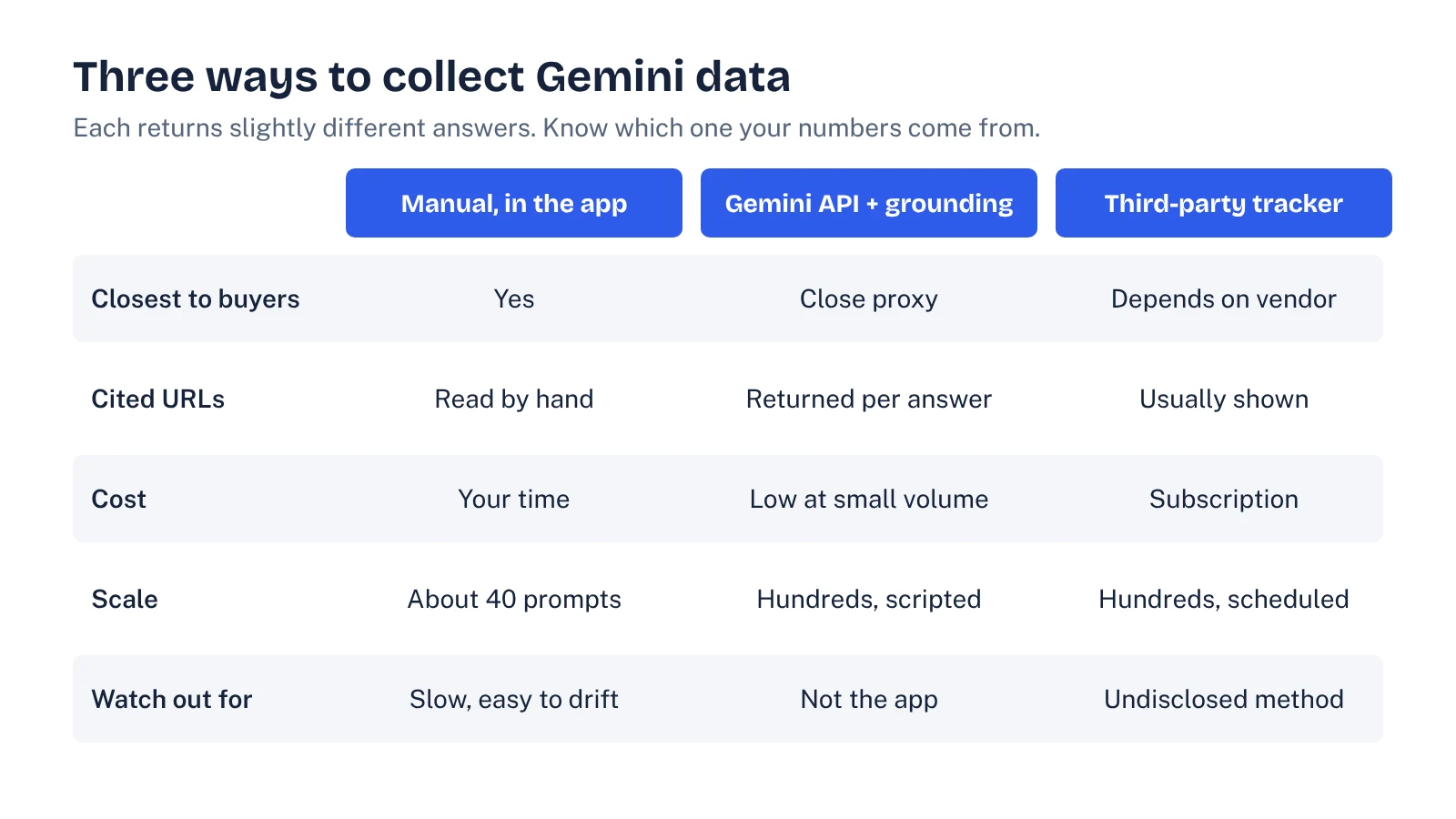
- There are three ways to collect Gemini data: manual checks in the app, scripts on the Gemini API with Google Search grounding, or a third-party tracker. They don't return identical answers.
- Answers vary from run to run. At a 30% mention rate, 20 prompt runs give a margin of error of about ±20 points; you need roughly 120 to get near ±8.
- Report four numbers: mention rate, citation rate for your own pages, share of voice against named competitors, and the domains Gemini cites instead of you.
- Ask any tool how it collects answers, how often it repeats each prompt, and whether you can export the raw responses before you pay.
What a Gemini visibility tracker measures
Gemini is now one of the places your buyers ask for a shortlist. Google said in August 2026 that the Gemini app had passed 1 billion monthly active users. When someone asks it "what are the best tools for [your category]," it either names you or it doesn't, and it either links your pages or someone else's.
A Gemini visibility tracker turns that into numbers. It runs a fixed list of prompts on a schedule, saves each answer, and records four things:
- Mentions. Is your brand named in the answer at all?
- Citations. Is one of your URLs among the sources Gemini links?
- Competitors. Which other brands appear, and how often?
- Cited domains. Which sites does Gemini lean on for your category: review sites, publishers, forums, vendors?
Some tools add a position (how high in the answer you appear) and a sentiment tag. Those can be useful, but they're softer measures. Start with the four above.
If you want the "how do I get cited" side of this, our guide to Gemini SEO and how the Gemini app picks sources covers it. This post is about measurement.
Why you have to sample Gemini yourself
Google gives you some AI data, but not for the app. Search Console's generative AI performance report shows impressions for AI Overviews and AI Mode on Google Search, broken down by page, country, date and device. Google's help page for it doesn't mention the Gemini app. So if a buyer asks Gemini for a shortlist, no Google report tells you whether you were on it.
Search demand reflects the gap. We pulled the related queries from Ahrefs Keywords Explorer this morning (US, November 5, 2026):
| Query | US monthly searches | Keyword difficulty |
|---|---|---|
| gemini visibility tracker | 1,000 | 0 |
| gemini rank tracking | 700 | not yet scored |
| ai visibility metrics gemini | 700 | not yet scored |
| gemini rank tracker | 350 | not yet scored |
| track visibility in gemini | 150 | not yet scored |
| gemini visibility | 70 | not yet scored |
The search results for "gemini visibility tracker" are almost all tool landing pages. In the US SERP we checked, an AI Overview sat on top, seven of the eight organic results were product landing pages, and only the last one was a guide. Plenty of tools, little explanation of what their numbers mean. That's the gap this post fills.
Three ways to collect Gemini data
Every tracker, including the one you build in a spreadsheet, gets its answers in one of three ways. They don't return identical results, so know which one you're looking at.
1. Manual checks in the Gemini app
You type each prompt into gemini.google.com or the mobile app, open the sources, and log what you see. It's the closest thing to the buyer's experience. It's also slow: 40 prompts run three times is 120 answers to read and log.
2. Scripts on the Gemini API
The Gemini API has a Grounding with Google Search tool. When it's on, the response tells you which search queries the model ran and attaches URL citations to spans of the answer, each with the URL, title and the start and end of the text it supports. That's most of what a tracker needs, in a format a script can log.
Cost is low at small volumes. According to Google's documentation, Gemini 3 and newer models bill each search query the model runs, with 5,000 free search requests a month shared across those models and $14 per 1,000 after that. Model token charges are separate. If 40 prompts run three times a week each triggered five searches, that's about 2,600 searches a month, inside the free allowance.
The catch: the API is not the app. The consumer app has its own settings and features, so an API answer is a close proxy, not a copy. Spot-check a sample against the app each month.
3. A third-party tracker
Tools from SEO suites and newer AI-visibility vendors run your prompts on a schedule and give you dashboards. SE Ranking's Gemini tracker page, for example, lists brand mentions, links, positions in the answer, competitor visibility, cited domains and history across countries. What most product pages don't say is how answers are collected (app, API, or something else) or how many times each prompt runs. Those two details decide how much you can trust the chart.
How many prompt runs you need for a number you can trust
Gemini doesn't give the same answer twice. Run one prompt three times and you can be named in two answers and missing from the third. So a mention rate is an estimate from a sample, and a small sample swings a lot.
Here's the simple version of the math. If your true mention rate is 30%, the 95% margin of error on your measured rate is about ±1.96 × √(0.3 × 0.7 ÷ n), where n is the number of answers you logged:
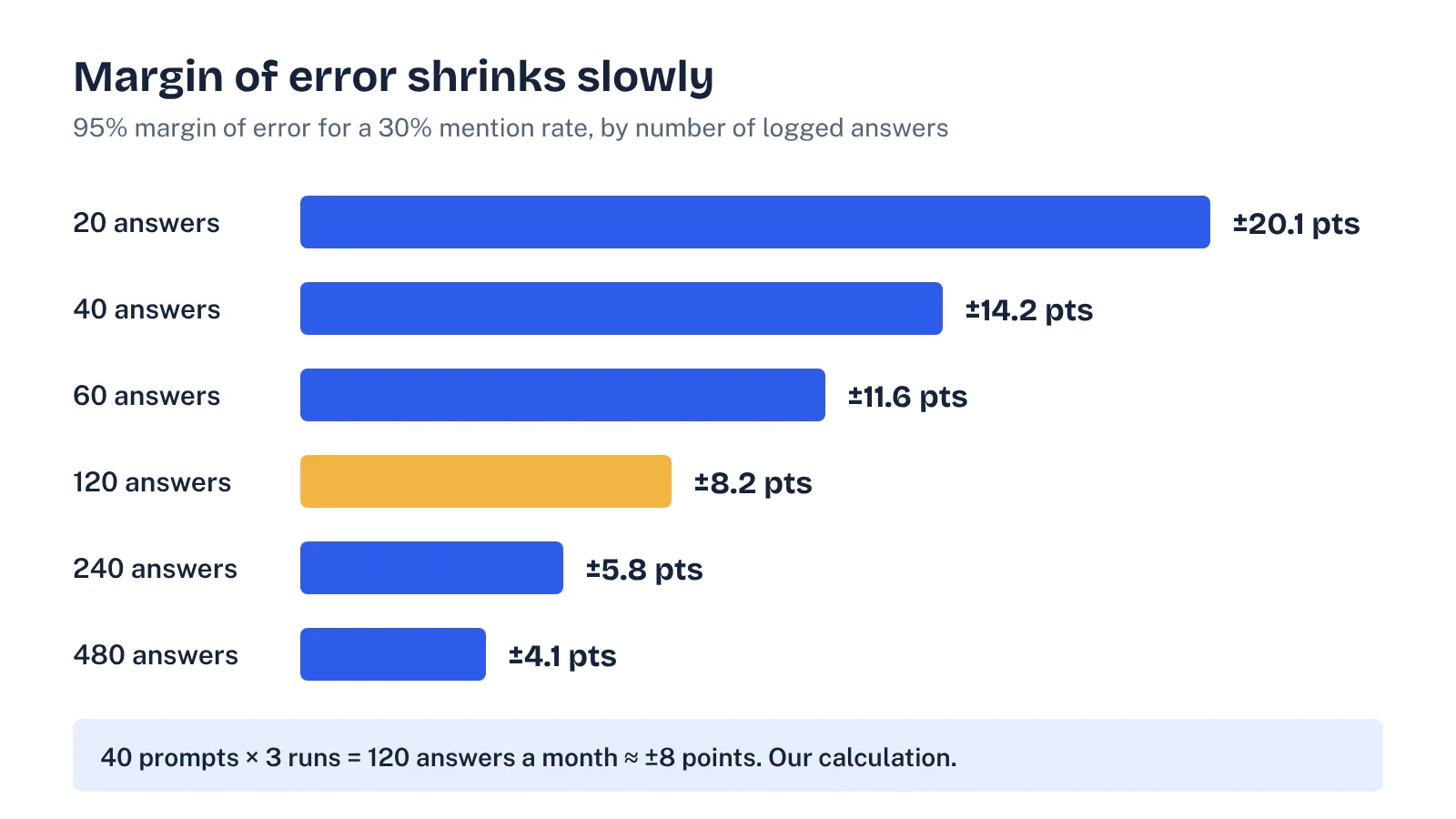
Two practical conclusions:
- Twenty answers is a smoke test, not a metric. A move from 30% to 40% at that size is well inside the noise.
- About 120 answers a month gets you to roughly ±8 points. That's 40 prompts run three times, which is the setup we recommend for most B2B SaaS teams.
The real margin is a little wider than the chart, because three runs of the same prompt are more alike than three different prompts. Treat the numbers as a floor. And if you split results by topic cluster, each cluster has its own, smaller sample.
Set up a Gemini tracker in a week
Whether you use a tool or a sheet, the setup is the same. Do it once, carefully, and keep it fixed.
- Write 40 prompts. Use real buyer questions: category shortlists, "[you] vs [competitor]," pricing, "best tool for [use case]," and a few problem-led questions. Sales call notes are the best source.
- Tag each prompt by funnel stage and topic cluster, so you can report by cluster later.
- Name your competitors. List four to six brands and their domains. Share of voice only means something against a fixed set.
- Fix the conditions. Same country, same language, signed out or a clean profile, same day each month. Write the conditions down.
- Run each prompt three times and log every answer: date, prompt, mentioned (yes/no), your cited URLs, competitor mentions, all cited domains.
- Save the raw text of each answer. You'll want it when a number moves and someone asks why.
- Check your access. Google's Google-Extended token controls whether your content can be used to ground Gemini answers, and Google says it doesn't affect Search inclusion or ranking. If your robots.txt blocks it, fix that before you measure.
For the full logging format, our LLM citation tracking ledger works for Gemini without changes. If this is your first baseline across every assistant, the free template in our AI visibility audit guide covers Gemini alongside ChatGPT, Perplexity and AI Overviews.
See your own AI visibility, free
Get a one-page audit of how ChatGPT, Perplexity and Gemini treat your brand against up to three competitors, plus your biggest gap. In your inbox within 48 hours.
Get my free auditThe four Gemini metrics worth reporting
| Metric | How to calculate it | What it tells you |
|---|---|---|
| Mention rate | Answers that name you ÷ all answers | Whether Gemini knows you belong in the category |
| Citation rate | Answers that link one of your URLs ÷ all answers | Whether your own pages are trusted as sources |
| Share of voice | Your mentions ÷ mentions of you plus your named competitors | Your position against the brands you actually compete with |
| Cited domains | Count of answers citing each domain | Where to earn coverage: the review sites, publishers or forums Gemini uses for your category |
Mention rate and citation rate often diverge. Gemini can name you while citing a review site, or cite your blog post without recommending your product. The gap tells you what to work on: positioning and third-party coverage when you're cited but not named, and better commercial pages when you're named but never linked. Our post on AI share of voice goes deeper on the competitor view.
When a Gemini visibility tracker tool is worth paying for
A manual sheet is enough for one product, one country and 40 prompts. A tool starts to pay off when you need several countries or languages, more than about 100 prompts, weekly checks, or the same dashboard across Gemini, ChatGPT, Perplexity and AI Overviews.
Before you buy, ask the vendor these questions. If they can't answer, assume the worst.
- Do you collect answers from the Gemini app, the API, or something else?
- How many times do you run each prompt per check, and on how many days?
- Which country, language and signed-in state do you use?
- Can I export the raw answer text and cited URLs, not only the scores?
- How do you decide that a brand was "mentioned"? Do you handle product names, abbreviations and misspellings?
- Can I bring my own prompt list, or do you generate prompts from keywords?
The last one matters more than it looks. Prompts generated from keywords tend to be shorter and more generic than the questions buyers actually ask. For a wider comparison of vendors, see our roundup of AI visibility tools.
Common Gemini tracking mistakes
- Reading one run as the answer. A single check is an anecdote. Use the sample sizes above.
- Changing the prompt list every month. Then you can't tell whether visibility moved or the questions did. Add new prompts as a separate set.
- Mixing Gemini with AI Overviews. They share Google's index but they're different products. Search Console covers AI Overviews and AI Mode; the app needs its own sample.
- Tracking only mentions. Without cited domains, you know you're missing but not where to fix it.
- Trusting a dashboard you can't audit. If you can't see the raw answers, you can't explain a drop to your CEO.
What to do with the first month of data
Your first month is a baseline, not a verdict. Look at three things. Which prompts never mention you: those are your content and positioning gaps. Which domains Gemini cites most for your category: those are your outreach and review-site targets. Which of your pages get cited: those are the formats to repeat.
Then pick one cluster, make two or three changes, and check again next month with the same prompts, the same conditions and the same number of runs. That discipline is what turns a Gemini visibility tracker from a dashboard into a decision tool.
FAQ
Does Google Search Console show Gemini app visibility?
No. Search Console's generative AI performance report shows impressions in AI Overviews and AI Mode on Google Search. Google's help page for the report doesn't mention the Gemini app, so app visibility has to be measured by sampling prompts yourself or with a tracking tool.
How do I track brand mentions in Gemini for free?
Write 20 to 40 buyer prompts, run each one in the Gemini app two or three times in a clean profile, and log every mention and cited URL in a sheet. Repeat on the same day each month. It costs time rather than money, and it gives you a baseline to judge any paid tool against.
Is the Gemini API the same as the Gemini app for tracking?
Not exactly. The API with Grounding with Google Search returns the search queries the model ran and the cited URLs, which is useful for tracking. But the consumer app has its own system settings and features, so treat API results as a close proxy and spot-check them against the app.
How often should I check Gemini visibility?
Monthly is enough for most B2B SaaS teams, with weekly checks on a small set of high-intent prompts during a launch or a content push. Changes smaller than your margin of error are noise, so more frequent checks on a small sample mostly add confusion.
Sources
- Google Search Console Help: Generative AI performance report
- Google AI for Developers: Grounding with Google Search (Gemini API)
- Google Search Central: Google's common crawlers (Google-Extended)
- SiliconANGLE: Google's Gemini AI app passes 1 billion monthly active users (August 2026)
- SE Ranking: Gemini Visibility Tracker (product page)
- Ahrefs Keywords Explorer and SERP overview (US data pulled 5 November 2026)