How to rank in AI Mode: a B2B SaaS playbook after Google's October link update
To rank in AI Mode, your page has to be indexed and eligible for a snippet; Google says nothing else is required. What decides whether you're cited is coverage of the sub-questions AI Mode searches behind the scenes, and whether your brand is the kind of entity it names. This guide shows how to rank in AI Mode as a B2B SaaS team and how to measure it with Google's new reports.
- Google's rule for AI Mode is the same as for AI Overviews: indexed and snippet-eligible, with no special markup or optimization.
- AI Mode is not a longer AI Overview. In Ahrefs' study the two cited the same URL only 13.7% of the time, and AI Mode named about 2.5x more brands per answer.
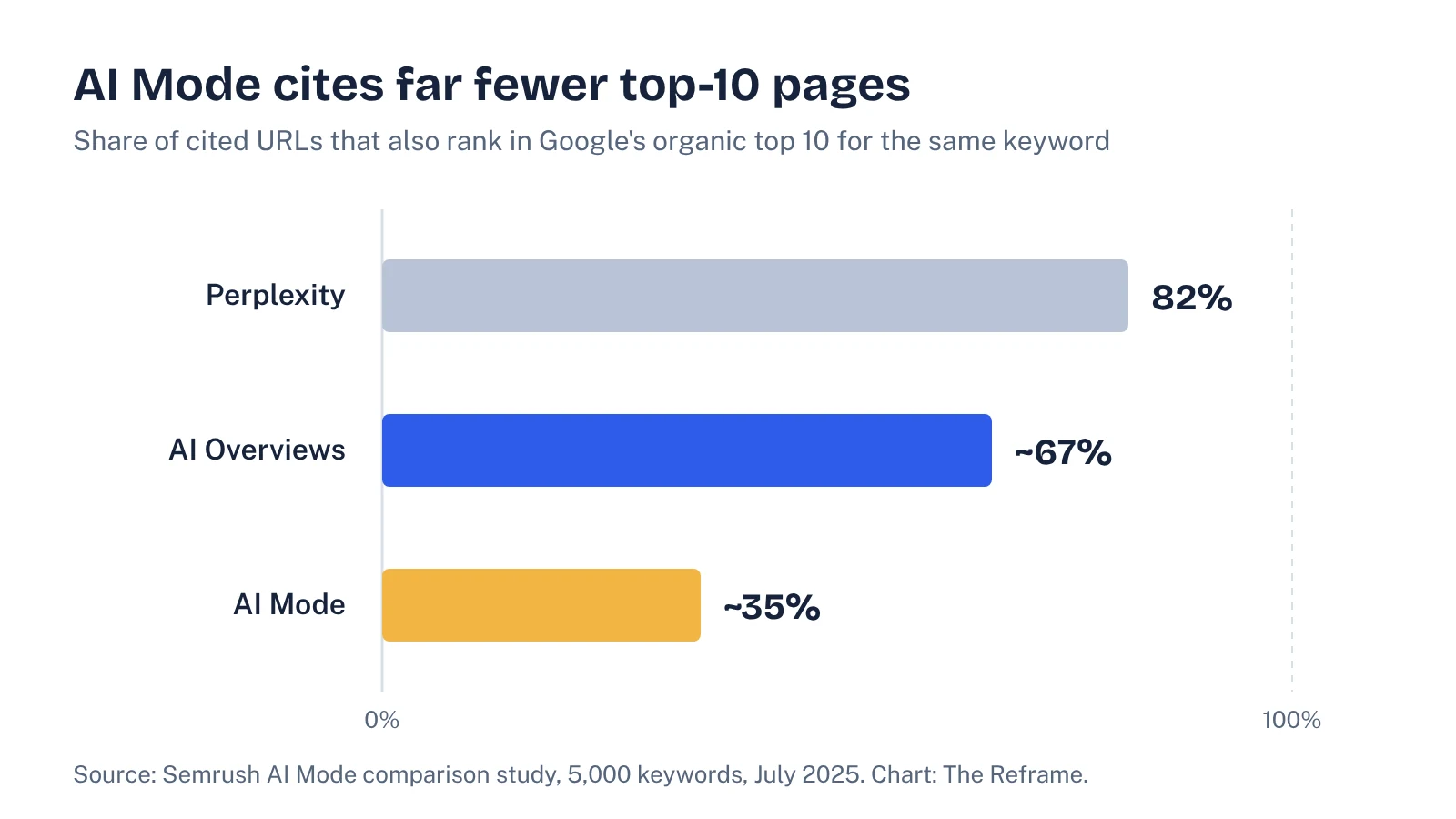
- In Semrush's study only about 35% of AI Mode's cited URLs ranked in Google's top 10, so fan-out sub-queries and third-party pages matter more than one head term.
- Google's October 15, 2026 update puts inline links higher and more often in AI answers, which makes being the cited page worth more than before.
- Search Console's generative AI reports now show AI Mode impressions by page, but still no clicks. Pair them with a fixed prompt set.
What Google requires to appear in AI Mode
Start with the official rule, because it's shorter than most guides suggest. Google's documentation on AI features says a page must be "indexed and eligible to be shown in Google Search with a snippet." It also says: "There are no additional requirements to appear in AI Overviews or AI Mode, nor other special optimizations necessary."
So there's no AI Mode tag, no special schema type and no separate index to submit to. Google's list of best practices is ordinary SEO hygiene, with two lines worth reading twice:
- Make sure crawling is allowed "in robots.txt, and by any CDN or hosting infrastructure." A firewall rule that blocks Googlebot blocks AI Mode too.
- Make sure your structured data matches the visible text on the page.
The same page explains the part that does change how you plan content. AI Overviews and AI Mode "may use a 'query fan-out' technique, issuing multiple related searches across subtopics and data sources, to develop a response." One question from a buyer becomes many searches, and each one is a chance for your page, or a competitor's, to be pulled in.
How AI Mode picks sources differently from AI Overviews
It's tempting to treat AI Mode as a longer AI Overview. The data says it isn't. Two large studies compared them side by side.
Ahrefs compared AI Mode and AI Overview answers for 540,000 query pairs (US data, September 2025). The two cited the same URL only 13.7% of the time. Their answers meant roughly the same thing (86% average semantic similarity) but used different words and different sources. AI Mode answers were about four times longer and mentioned 3.3 entities, such as brands and people, per response against 1.3 for AI Overviews. Only 34.66% of AI Mode answers named no brand at all, compared with 59.41% of AI Overviews.
Semrush's study of 5,000 keywords (July 2025) looked at overlap with Google's organic top 10. About 35% of the URLs AI Mode cited also ranked in the top 10 for that keyword, against about 67% for AI Overviews and 82% for Perplexity. AI Mode's link sidebar showed about seven unique domains per answer; AI Overviews showed three.
Both studies are from 2025 and AI Mode has changed since, so treat the exact numbers as direction, not law. The direction is consistent, though, and it has three practical consequences for a SaaS team:
- Your head-term ranking explains less. If two-thirds of AI Mode's cited URLs aren't in the top 10, the pages that win are the ones that answer fan-out sub-questions well.
- More brands get named. AI Mode has room for a shortlist. That's good news if you're the fourth or fifth vendor in a category, because you can be on the list without being the market leader.
- Third-party pages carry more weight. Ahrefs found Wikipedia made up 28.9% of AI Mode citations against 18.1% for AI Overviews, and Quora appeared 3.5 times more often. Semrush found Reddit the most cited domain across every platform it tested.
What changed in Google's October 2026 update
On October 15, 2026, Google published "More ways to connect with the web from Search", a set of changes to AI Mode and AI Overviews. Search Engine Land's summary covers the same list. What matters for B2B SaaS:
| Change | Status | What it means for a SaaS site |
|---|---|---|
| More inline links, placed higher in AI responses | Rolling out | Being the cited page for a specific claim is worth more. Clear, quotable answers near the top of a section are easier to link to. |
| A dedicated section at the top for the one or two official sites that can complete a task | Testing | Questions like "how do I export data from [your product]" may send people straight to your docs. Keep help-center pages indexable and accurate. |
| Related-article links with thumbnails at the end of some answers | Rolling out | Pages with a good, relevant lead image look more clickable. Check your og:image and hero image on key guides. |
| Wider news carousels that highlight Preferred Sources | Rolling out | Mostly a publisher feature. Google says Preferred Sources use has grown more than 7x since the start of the year. |
| Clickable creator and publisher names on video results in AI Mode | Testing | If you publish product videos, your channel's Google Search profile may get the click rather than your site. |
None of this changes the eligibility rule. It changes the payoff. If AI Mode shows more links, higher up, then the gap between being cited and being merely relevant gets wider. Search Engine Land's Barry Schwartz is skeptical that searchers will click much more, and he points out that Google still doesn't report AI click data in Search Console. That's a fair caution, and it's why measurement comes later in this guide.
How to rank in AI Mode: a 6-step process for B2B SaaS
This is the order we'd work in. Steps 1 and 2 are technical checks you can finish in an afternoon; steps 3 to 6 are where most of the gains come from.
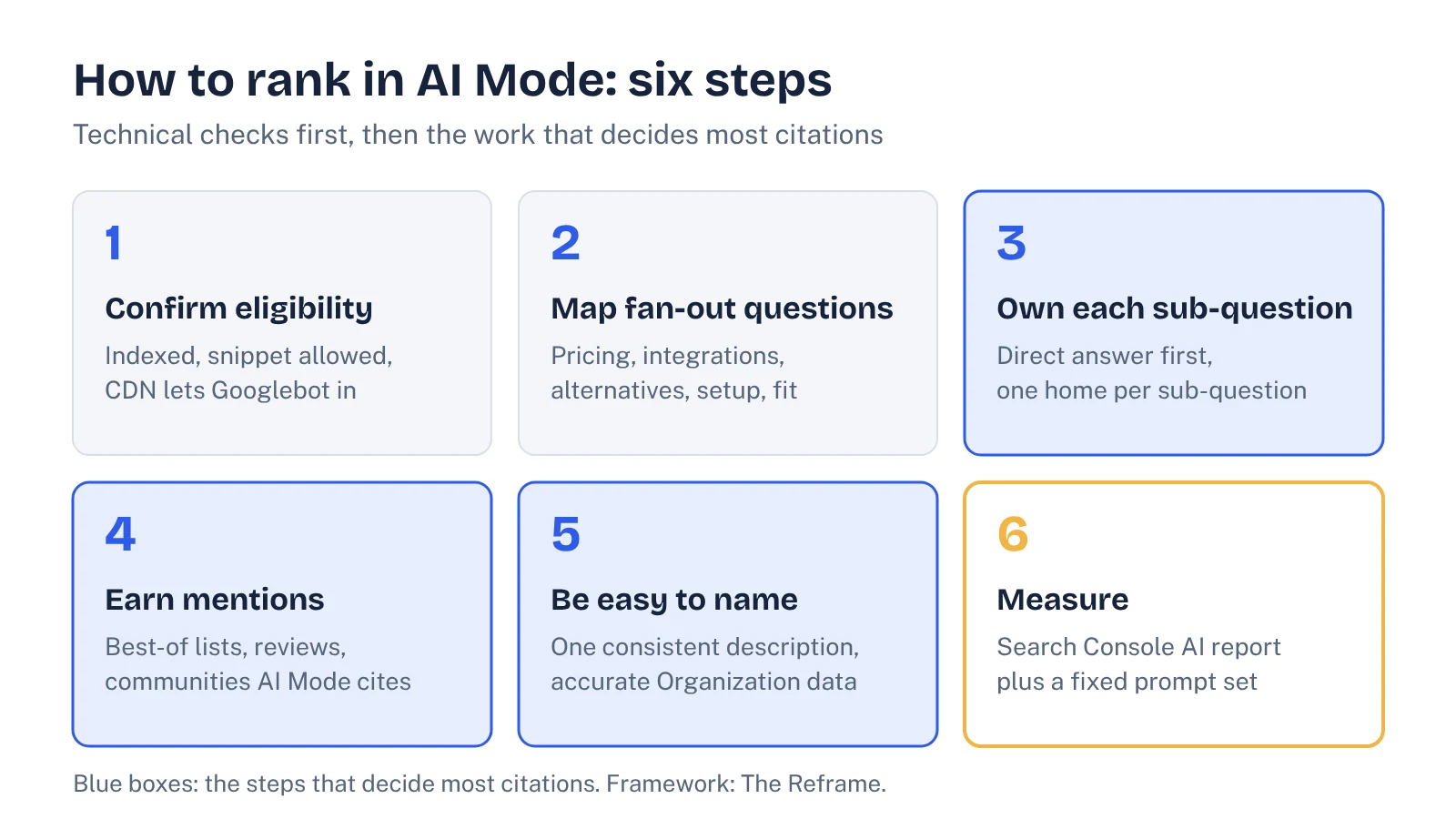
1. Confirm eligibility on the pages that matter
Pick your 20 to 30 most commercial URLs: category pages, comparison and alternatives pages, pricing, integration pages and your best guides. For each one, confirm in Search Console's URL Inspection that it's indexed, that no nosnippet or restrictive max-snippet is set, and that your CDN or bot-management rules let Googlebot through. Our guide to AI crawlers covers the firewall checks.
2. Map the fan-out questions behind each buying query
Take a query like "best customer onboarding software for B2B SaaS." AI Mode won't only search that string. Expect sub-searches on pricing, integrations, setup time, company size, alternatives to the leaders and reviews. Write those down for each of your 10 to 15 core buying queries. Sources for the list: People Also Ask, Ahrefs or Semrush question keywords, sales call notes, and the follow-up questions AI Mode itself suggests.
3. Answer each sub-question on the page that should own it
Don't stuff every sub-question into one page. Give each one a clear home: pricing questions on the pricing page, integration questions on integration pages, "X vs Y" on a comparison page. Open each section with a direct two or three sentence answer, then the detail. Inline links in AI answers point at specific claims, so the claim needs to be stated plainly near the top of the section.
4. Earn mentions on the third-party pages AI Mode cites
Because AI Mode leans more on Wikipedia, Quora, Reddit and similar sites, look at which third-party pages it cites for your buying queries and work through them: get listed on the "best X" articles that appear, keep review profiles current, and answer real questions in communities where your buyers ask them. Our guide to earning AI brand mentions has the full playbook.
5. Make your brand easy to name
AI Mode names more entities, so help it understand which entity you are and what category you belong to. Use one consistent one-line description of your product across your homepage, About page, review profiles and social bios. Keep Organization structured data accurate and matching the visible text, as Google asks. Our guide to schema markup for AI search explains which types are worth keeping.
6. Measure with Search Console and a fixed prompt set
Covered in the next section. Without it, you won't know whether steps 3 to 5 worked.
See your own AI visibility, free
Get a one-page audit of how ChatGPT, Perplexity and Gemini treat your brand against up to three competitors, plus your biggest gap. In your inbox within 48 hours.
Get my free auditHow to measure AI Mode visibility
Until this year you couldn't see AI Mode in Search Console at all. On June 3, 2026, Google announced Search generative AI performance reports. According to PPC Land's breakdown, they show impressions in AI Overviews and AI Mode (plus Discover's AI features), with breakdowns by page, country, device and date. Three limits matter:
- No clicks yet. You can see that a page appeared, not whether anyone clicked it. Google says more metrics will come over time.
- Not every site has it. Google is rolling the reports out to a subset of websites.
- An impression needs a link. As SEO-Day reports Google's John Mueller explaining it, a page is counted when a link to it is shown in the AI answer, so being named without a link doesn't register.
That last point is why Search Console alone undercounts AI Mode for brands. If AI Mode names your product in a shortlist but links to a G2 page, your site gets no impression. Pair the report with a fixed prompt set: the same 20 to 40 buying questions, checked in AI Mode on a regular schedule, recording whether you're named, whether you're linked, which competitors appear and which third-party pages are cited. Our guide to AI Overview tracking walks through the sheet, and the same structure works for AI Mode.
| Signal | Where to see it | How often |
|---|---|---|
| Pages getting AI Mode impressions | Search Console, generative AI report, Pages tab | Weekly |
| Brand named in AI Mode answers (linked or not) | Your prompt set | Every two to four weeks |
| Competitors and third-party pages cited | Your prompt set | Every two to four weeks |
| Visits and demo requests that started in AI search | Analytics plus a "how did you hear about us" field | Monthly |
How much search demand is there for AI Mode SEO?
We checked Ahrefs Keywords Explorer (US) on October 21, 2026. "Google ai mode" gets about 26,000 searches a month with a keyword difficulty of 7. Questions about optimizing for it are much smaller but clear: "what is google ai mode" about 400, "how to rank in ai mode" about 350, "ai mode seo" about 200 (KD 17) and "ai mode optimization" about 70. Ahrefs also lists dozens of "best AI Mode rank tracker" variants at 800 to 1,400 searches each; they look like automated queries rather than people, so we've ignored them.
The takeaway: buyers and marketers are still working out what AI Mode is. That leaves room for a SaaS brand to be the clear, cited answer in its category before the space gets crowded.
Common AI Mode SEO mistakes
- Chasing a special trick. Google is explicit that there isn't one. Time spent on AI-specific markup is time not spent on fan-out coverage.
- Checking one query once. AI answers vary between runs. Judge the trend across a prompt set, not a single screenshot.
- Ignoring docs and help pages. With Google testing an official-sites section for tasks, your help center may become your most-cited content for product questions.
- Reading Search Console impressions as the whole picture. They miss unlinked brand mentions, which is often how a shortlist looks.
- Copying the AI Overviews plan. The overlap is low. Check AI Mode separately for your core queries; our guide on how to rank in AI Overviews covers the other surface.
FAQ
What is Google AI Mode?
AI Mode is a conversational search experience inside Google Search. It answers longer questions and follow-ups with a generated response and links, and Google says it may run many related searches across subtopics (query fan-out) to build each answer.
Is AI Mode SEO different from AI Overviews SEO?
The eligibility rules are identical, and Google says no special optimization is needed for either. The difference is in what gets cited: AI Mode answers are longer, link to more domains and name more brands, and they often cite different URLs than the AI Overview for the same query.
Can I see AI Mode traffic in Search Console?
Partly. Google's generative AI performance reports, announced in June 2026 and rolling out to a subset of sites, show impressions in AI Overviews and AI Mode by page, country, device and date. They don't show clicks yet, so you still need analytics and a prompt set to judge impact.
Do I need schema markup to appear in AI Mode?
No. Google says there are no additional requirements for AI Mode. It does recommend that any structured data you use matches the visible text on the page, so keep existing markup accurate rather than adding new types for AI.
How do I stop my content appearing in AI Mode?
Google points to the same controls as normal snippets: nosnippet, data-nosnippet, max-snippet and noindex. These also limit how the page appears in regular results, so most SaaS teams shouldn't use them on commercial pages.
Sources
- Google Search Central: AI features and your website
- Google: More ways to connect with the web from Search (October 15, 2026)
- Search Engine Land: Google updates AI Mode and AI Overviews with more links, context, carousels and creator info
- Google Search Central Blog: Introducing Search generative AI performance reports in Search Console (June 2026)
- PPC Land: Google gives Search Console its own generative AI visibility reports
- SEO-Day: When Google's AI performance reports count impressions
- Ahrefs: AI Overviews vs AI Mode, what's different
- Semrush: AI Mode comparison study