AI content optimization: how to rework your B2B SaaS pages for AI answers

AI content optimization means making your existing pages easy for AI systems like Google's AI Overviews, ChatGPT and Perplexity to find, understand and cite. For most B2B SaaS teams that is less about new tricks and more about specific, current, first-hand facts on the pages buyers ask about. This guide covers which pages to fix first, what you can safely skip, and a six-step rework process with a worked example.
- Google's own guide says there's no special markup, no need to chunk content and no need to rewrite for AI. The work is making pages more specific and more useful.
- Start with the pages AI answers draw on when buyers compare vendors: comparison, alternatives, pricing, integration and security pages.
- Rework one page at a time: pick the buyer prompt, check what answers say now, fix facts, add proof, make the answer easy to lift, then re-check.
- Vague claims are the biggest problem on SaaS pages. Replace them with numbers, limits, dates and named use cases an assistant can quote.
- Use AI tools for audits and drafts, not for the facts. The value you add is the information only your team has.
What AI content optimization means (it has two meanings)
Search for "AI content optimization" and you get two different topics mixed together. One is using AI tools to optimize content: drafting meta descriptions, clustering keywords, tightening readability. The other is optimizing content for AI: making your pages easy for AI Overviews, AI Mode, ChatGPT, Gemini and Perplexity to find, understand and cite.
This guide is about the second meaning, with a short section on the first. For a B2B SaaS company it is the one with commercial stakes. When a buyer asks an assistant "which onboarding tool works for a 50-person customer success team", the answer is built from pages like yours. If your pages are vague, out of date or hard to parse, the assistant fills the gaps with someone else's description of you, or with a competitor.
The good news: you don't need a new type of content. You need your existing pages to say specific, true things clearly. That is mostly editing work, and it is the part of AI search optimization your content team fully controls.
What people search for, and what the top results miss
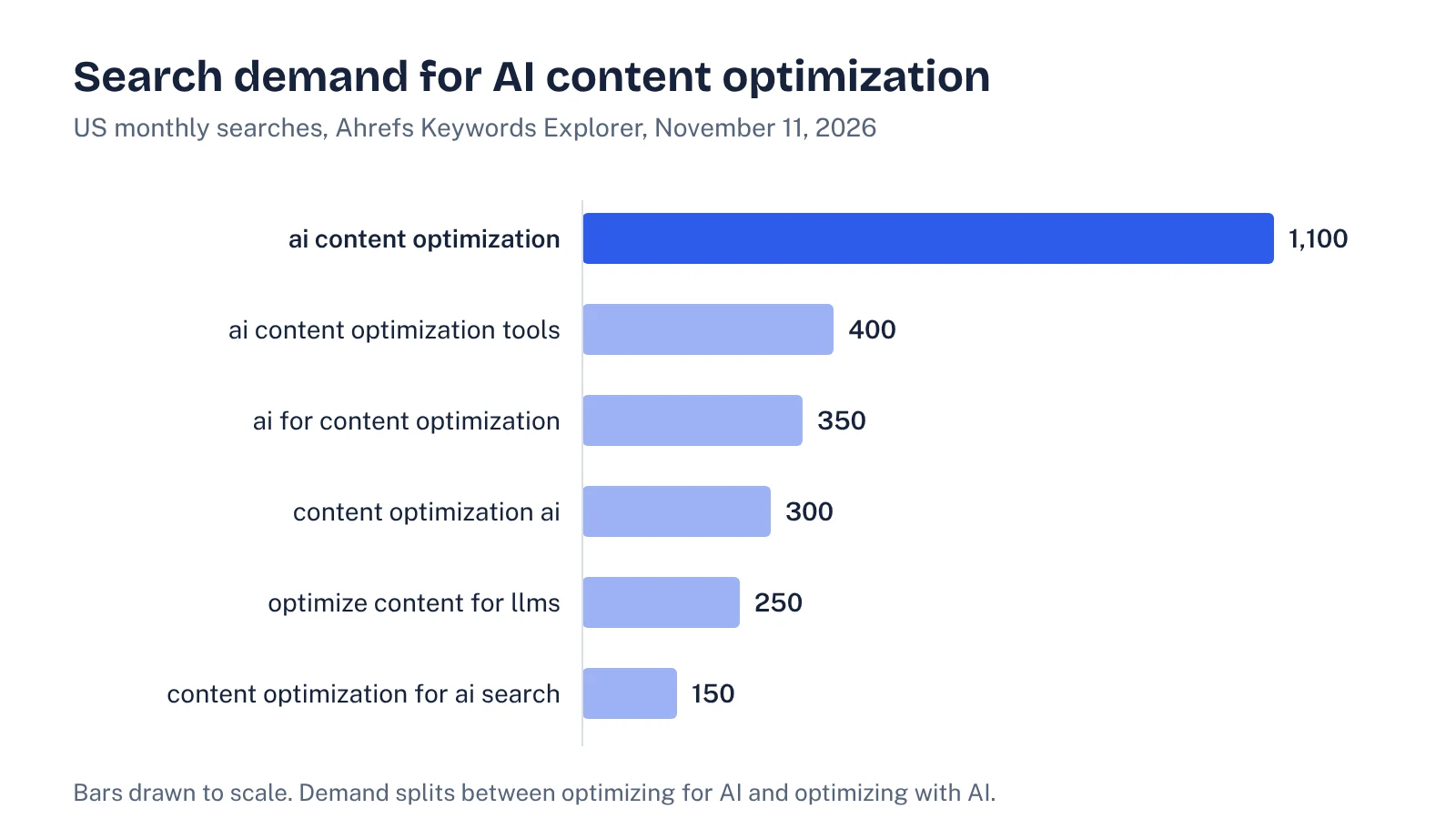
We pulled the numbers from Ahrefs Keywords Explorer this morning (US, November 11, 2026). The head term is busy, and the variants split between "optimize for AI" and "optimize with AI" intent:
| Query | US monthly searches | Keyword difficulty |
|---|---|---|
| ai content optimization | 1,100 | 5 |
| ai content optimization tools | 400 | 17 |
| ai for content optimization | 350 | 27 |
| content optimization ai | 300 | 2 |
| optimize content for llms | 250 | not yet scored |
| content optimization for ai search | 150 | not yet scored |
The results page shows an AI Overview at the top. Google's own guide to optimizing for generative AI features ranks third, and Ahrefs estimates it gets about 6,300 organic visits a month, far more than any vendor article on the page. Two of the top ten results are community threads (Reddit and HubSpot Community) where marketers ask whether they are over-optimizing.
The ranking articles cover the basics well: short paragraphs, clear headings, cited data, fresh dates. What they mostly skip is the B2B SaaS reality. The pages that shape AI answers about software are comparison, pricing, integration and security pages, not blog posts. And the most common problem on those pages isn't structure. It's vagueness.
What Google says you don't need to do
Before you spend a sprint on AI content work, read the myth-busting section of Google's guide (last updated July 10, 2026). It rules out several popular tactics for Google's AI features:
| Popular tactic | What Google says | What to do instead |
|---|---|---|
| Add llms.txt or special AI markup | "Google Search itself doesn't use them." | Keep an llms.txt file only if other services use it. Don't count on it for Google. |
| Chunk content into small pieces | "There's no requirement to break your content into tiny pieces for AI to better understand it." | Write sections that each answer one question fully. Length follows the topic. |
| Rewrite with AI-friendly phrasing or long-tail variants | AI systems "can understand synonyms and general meanings." | Use your buyers' words once, clearly. Don't pad pages with variants. |
| Add special schema for AI | "There's no special schema.org markup you need to add." | Keep valid schema markup for rich results and consistency. |
| Create pages for every fan-out query | Doing this mainly to manipulate results "violates Google's scaled content abuse spam policy." | Cover the sub-questions inside one strong page. See our guide to query fan-out. |
Google's AI features documentation is just as direct about eligibility: a page must be indexed and eligible to show in Search with a snippet, and "there are no additional requirements to appear in AI Overviews or AI Mode." So the technical floor is ordinary SEO. Above that floor, Google's guide says the thing most likely to matter over time is "non-commodity content": first-hand perspective and expert insight people find unique and useful.
nosnippet tag or a tight max-snippet left over from an old legal review can quietly limit what Google is allowed to show from your pricing or security pages.Which pages to optimize first
Don't start with your blog. Start with the pages assistants need when a buyer asks them to compare, shortlist or check a vendor. These are also the pages closest to revenue.
| Page type | Buyer prompt it answers | Common gap |
|---|---|---|
| Comparison and alternatives pages | "[Competitor] vs [you]", "alternatives to [competitor] for agencies" | One-sided claims with no criteria, no dates, no honest "choose them if" |
| Pricing page | "How much does [you] cost for 25 users?" | "Contact us" with no ranges, plan limits hidden in images or toggles |
| Integration pages | "Does [you] integrate with Salesforce?" | A logo grid with no detail on what syncs, which direction, which plans |
| Security and compliance page | "Is [you] SOC 2 compliant?" | Certifications named without dates, scope or where to request reports |
| Use-case or industry pages | "Best [category] tool for healthcare teams" | Generic benefits that could describe any product in the category |
| Core product page | "What does [you] do?" | Taglines instead of a plain one-sentence definition and category |
If you don't know which prompts matter, do that first. Our guide to prompt research shows how to build a buyer prompt list, and the AI visibility audit guide shows how to baseline where you stand today before you change anything.
A six-step page rework process
Treat each page as a small project with a before and after. One page done properly beats twenty pages with a new FAQ block bolted on.
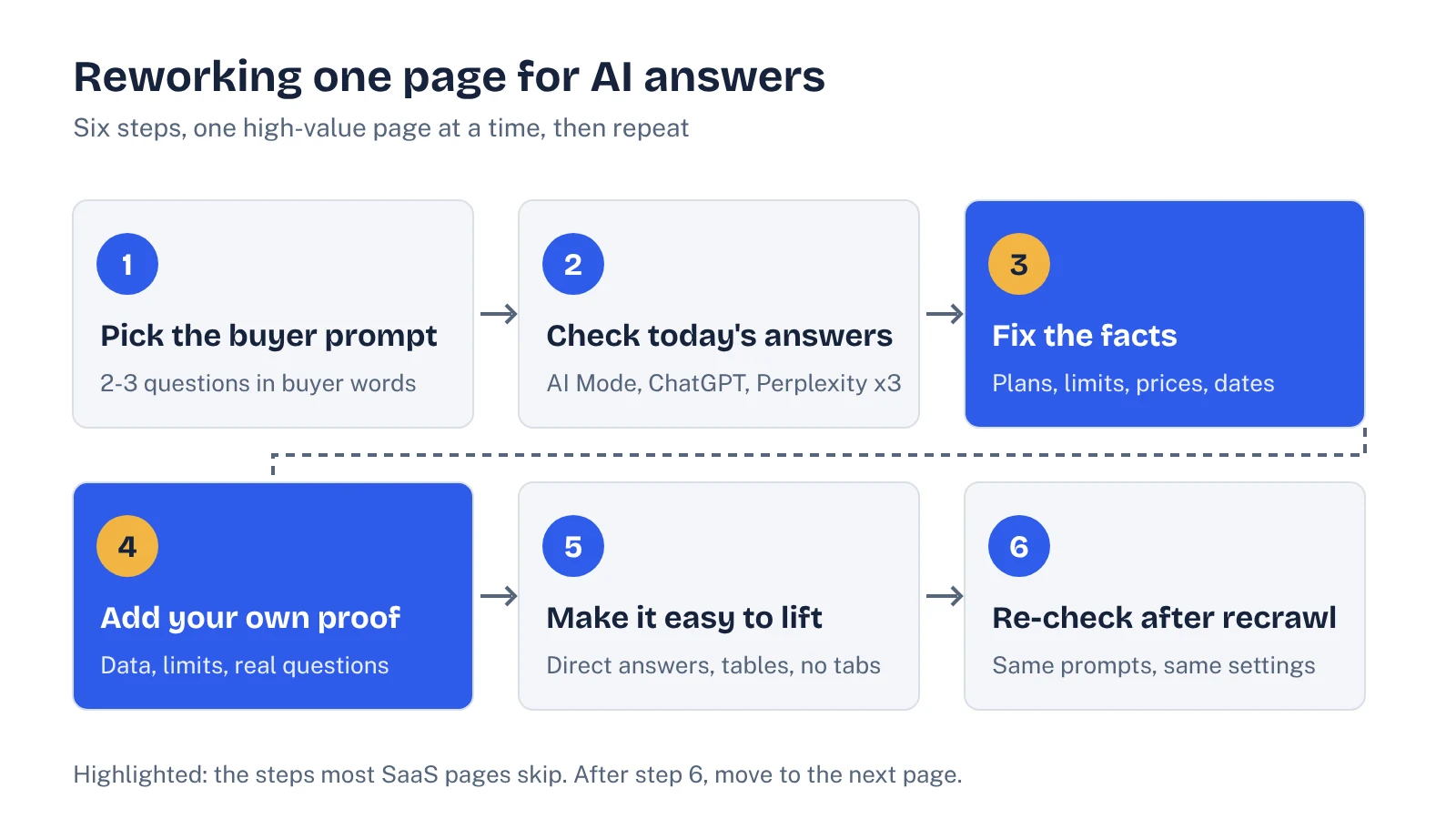
- Pick the buyer prompt. Write down the two or three questions this page should answer, in buyer language. "Does Acme integrate with HubSpot, and what syncs?" is a target. "Integrations" is not.
- Check today's answers. Ask those prompts in Google AI Mode, ChatGPT and Perplexity, three runs each. Note whether you are mentioned, whether this page is cited, and what is wrong or missing. Wrong facts are your top priority.
- Fix the facts. Make every claim current and specific: plan names, user limits, prices or ranges, supported regions, certification dates. Remove features you deprecated. Add a visible "last updated" date and mean it.
- Add proof only you have. This is the "non-commodity" part. Add a real setup time from your onboarding data, the three questions sales hears most, an honest limitation, a short screenshot walkthrough. Competitors and AI-written pages can't copy this.
- Make the answer easy to lift. Put a direct one or two sentence answer under each heading that matches a buyer question. Move key details out of images, tabs and accordions that need JavaScript. Use a table where buyers compare options.
- Re-check after recrawl. Request indexing in Search Console, wait, then run the same prompts the same way. Log what changed. Then move to the next page.
Freshness matters more than many teams expect, but it has to be real. A 2025 study by Fang and colleagues found that adding publication dates to passages shifted the average publication year of LLM-reranked top-10 results forward by up to 4.78 years across seven models (arXiv 2509.11353). Models lean toward recent content. Updating the date without updating the facts is not a fix, and buyers notice. Our content refresh guide covers which pages to update first and what counts as a real update.
See your own AI visibility, free
Get a one-page audit of how ChatGPT, Perplexity and Gemini treat your brand against up to three competitors, plus your biggest gap. In your inbox within 48 hours.
Get my free auditWorked example: rewriting a vague integration section
Here is a typical integration section on a SaaS site. The product is made up for this example.
An assistant asked "Does Acme sync deals with HubSpot?" can't answer from this. "Seamlessly" and "powerful" carry no information. It doesn't say what syncs, how often, or on which plan.
The rewrite is shorter in spirit but much richer: object types, direction, frequency, plan limits, setup requirements, a known limitation and a date. Each sentence answers a question a buyer could ask. It also helps human buyers and your sales team, which is the point Google keeps making: write for people, and the AI systems benefit too.
Apply the same test to every claim on a priority page: could an assistant quote this sentence as a fact about your product? If not, either make it specific or cut it.
Where AI tools help, and where they hurt
The other meaning of AI content optimization, using AI to optimize, is useful inside this process if you keep it in its lane.
- Good uses: listing every claim on a page so you can check it, spotting sections with no direct answer under the heading, suggesting buyer questions to cover, comparing your page against the pages cited for a prompt, and drafting meta descriptions.
- Risky uses: letting a model write product facts, pricing, compliance claims or integration details. Models fill gaps confidently. Every fact on a commercial page should come from your product, sales or security team.
- Avoid: generating near-duplicate pages for every keyword or fan-out variant. Google names this as scaled content abuse, and it dilutes the strong page you are trying to build.
Content editors such as Surfer and Semrush's tools are fine for coverage and readability checks. Just remember they score pages against what already ranks. The facts that make a page worth citing are the ones that don't appear anywhere else yet.
How to tell if it worked
Measure each reworked page against its own baseline, not against a general visibility score.
- Prompt checks. Re-run the step-two prompts, same tools, same settings, three runs each. Track whether answers mention you, cite the page, and get the facts right. Accuracy is a result in itself.
- Search Console. Google added generative AI performance reports to Search Console in June 2026, and its optimization guide points to them for monitoring. Watch the reworked page there alongside classic clicks and impressions.
- AI referral traffic. Segment visits from chatgpt.com, perplexity.ai and similar referrers in your analytics. Our guide to tracking AI traffic has the setup.
- Sales signals. Ask sales to note when prospects quote an AI answer. It is anecdotal, but it tells you which pages buyers actually see through assistants.
Give each change several weeks. Google needs to recrawl, and AI answers vary from run to run, so one good or bad check proves little.
A one-page checklist
- The page is indexed, snippet-eligible and renders key content without heavy JavaScript.
- Each priority heading has a direct one or two sentence answer under it.
- Every product claim is specific: names, numbers, limits, plans, dates.
- Outdated features, prices and screenshots are gone.
- The page includes at least one thing only your team knows.
- Comparisons are fair and say who each option suits.
- There's a real "last updated" date, and the facts match it.
- You logged the before and after prompt results.
Work through your comparison, pricing, integration and security pages first. That alone covers most of what assistants need to describe your product accurately.
FAQ
What is AI content optimization?
It usually means improving content so AI search features and assistants can find, understand and cite it. The phrase is also used for using AI tools to optimize content for classic SEO. For B2B SaaS, the first meaning matters more: it decides whether your product is described accurately when buyers ask AI for recommendations.
Do I need to rewrite my content for AI search?
No. Google's July 2026 guide says AI systems understand synonyms and general meaning, so special phrasing isn't needed. It also says there's no requirement to break content into tiny pieces. What helps is making key facts explicit, current and easy to find on the page.
Does structured data help with AI content optimization?
Google says structured data isn't required for its generative AI features and there's no special schema.org markup to add. It still helps with rich results and keeps your facts consistent, so keep valid markup in place, but don't expect it to get you cited on its own.
What are the best AI content optimization tools?
Content editors like Surfer or Semrush's tools help with coverage and readability, and AI visibility trackers show whether answers mention or cite you. Neither replaces the facts your team holds. Start with Search Console's generative AI report and a manual check of your key buyer prompts before buying anything.
How long does it take to see results from optimizing content for AI?
Google first has to recrawl the page, and AI answers vary from run to run, so judge changes over several weeks, not days. Compare the same prompts before and after, run each a few times, and watch Search Console and AI referral traffic for the page.
Sources
- Google Search Central: Optimizing your website for generative AI features on Google Search (updated July 10, 2026)
- Google Search Central: AI features and your website
- Google Search Central Blog: Introducing Search Generative AI performance reports in Search Console (June 2026)
- Fang et al.: Do Large Language Models Favor Recent Content? A Study on Recency Bias in LLM-Based Reranking (arXiv 2509.11353)
- Semrush: AI content optimization, the complete guide
- Surfer: AI content optimization for 2026
- Ahrefs Keywords Explorer and SERP overview, US data pulled November 11, 2026